If you’re a homeowner getting ready to move, one question usually comes first: should you buy your next home before you sell, or sell your current house before you start looking?
There’s no single right answer. The best call depends on your finances, your local market, and your timeline. And a trusted agent can help you weigh all of it.
But in a lot of cases these days, selling first puts you in the stronger spot.
The Advantages of Selling First
Selling is usually the trickier half of a move today, so getting it done first clears your biggest hurdle. And that’s especially true right now, because there are more homes for sale than there are buyers, which means houses are taking longer to sell than they did a year or two ago.
So how does leading with your sale pay off? Let’s start with the money.
1. You Won’t Get Stuck Paying Two Mortgages
Buy before you sell, and you could end up carrying two mortgages at once. And especially since houses are staying on the market longer these days, that overlap may drag on for more time than you’d planned. And if unexpected repairs come up, it could get even more expensive.
Selling first takes that risk off the table, so you’re not multitasking homeownership. As Ramsey Solutions puts it:
“It’s best to sell your old home before buying a new one to avoid unnecessary risks and possible headaches.“
2. You Can Use Your Equity To Fuel Your Move
This is always true, but one of the biggest perks of selling first is that you’ll know exactly how much money you’re walking away with. And one of the big figures that matters in that conversation is how much equity you have in your current place.
Equity is basically your house’s value minus what you still owe on your mortgage. And it adds up fast. According to Realtor.com, homeowners who’ve been in their home for 5 years have about $180,000 in equity on average. And those who’ve had their home for 6-10 years? They have over $340,000.
After you sell, you can use that money to cover your down payment or even buy your next home in cash. And knowing that profit up front helps you plan your next move.
3. Your Offer Will Be Hard To Pass Up
When your house is already sold, you don’t have to make your offer contingent on that sale. In a market where buyers are taking their time, that’s exactly what a seller wants to see.
Picture it from the seller’s side. If their house has been sitting for a while, they’ll gravitate toward the offer most likely to close without a snag.
That can also give you room to ask for a little more, like repairs, since a motivated seller would rather keep things moving than lose you and wait for another offer to come in. Your agent can help you make the most of your upper hand in that scenario.
Is There a Catch?
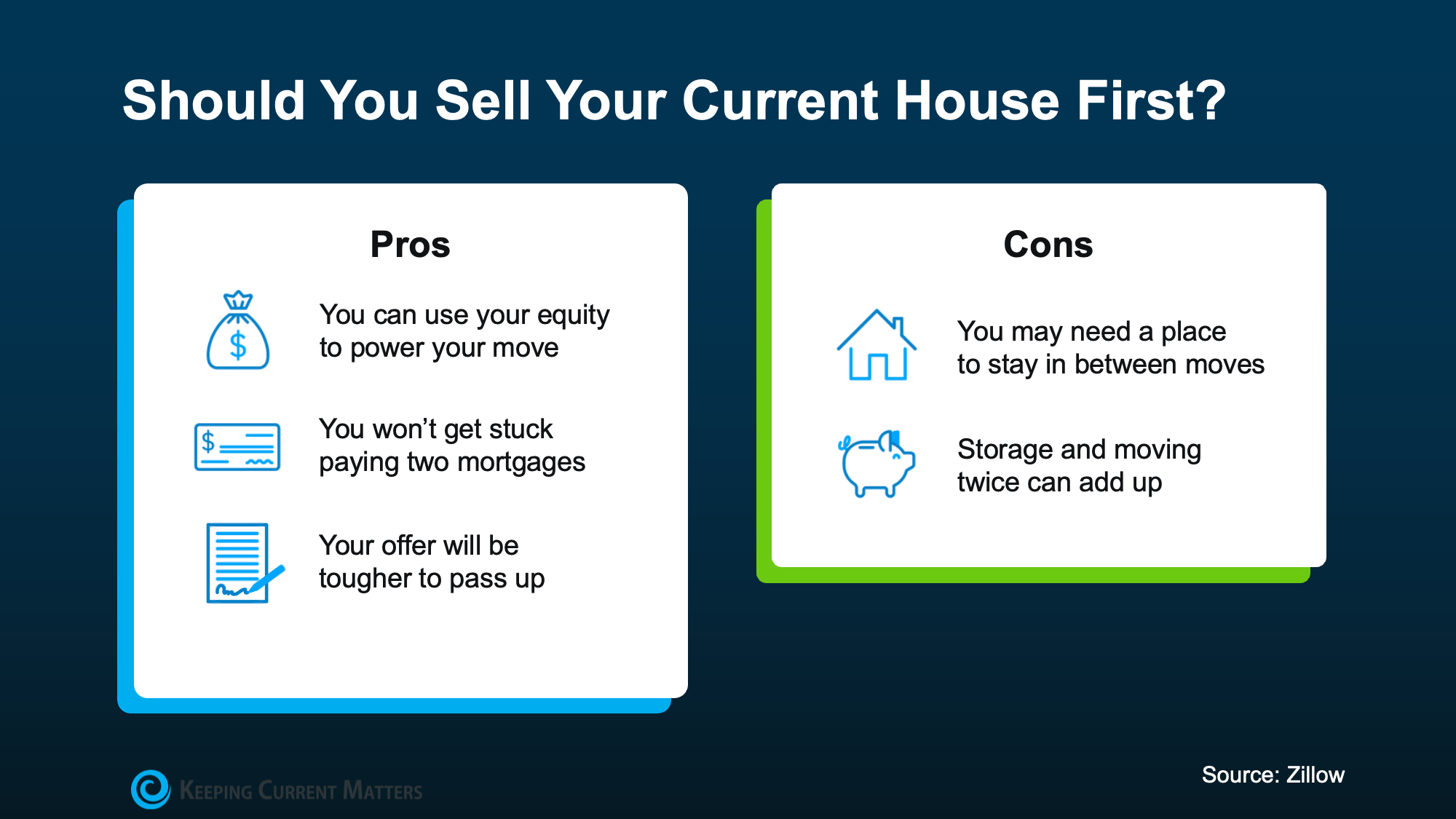
Selling first has its tradeoffs too, and it helps to see the pros and cons side by side before you decide. Here’s a quick breakdown based on information from Zillow(see visual below):
The cons are manageable with the right plan, so talk about them with your agent. They can help you negotiate things like a rent-back, where you stay in your house for a set time after closing, or line up flexible closing dates to keep the transition smooth.
Bottom Line
There’s no one-size-fits-all answer to buying and selling at once. But for a lot of homeowners, leading with the sale makes moving easier on their mind and their wallet.
Connect with a local agent, and they’ll help you navigate selling and buying with more confidence, more financial power, and less stress.
For years, a lot of would-be homebuyers have worried about the same thing. How do you compete with big investors who can swoop in, pay cash, and snap up the houses you want?
Well, worry a little less. Because right now, those big investors aren’t buying up the market. They’re backing out of it.
Investors Are Buying Fewer Homes Than They Have in Years
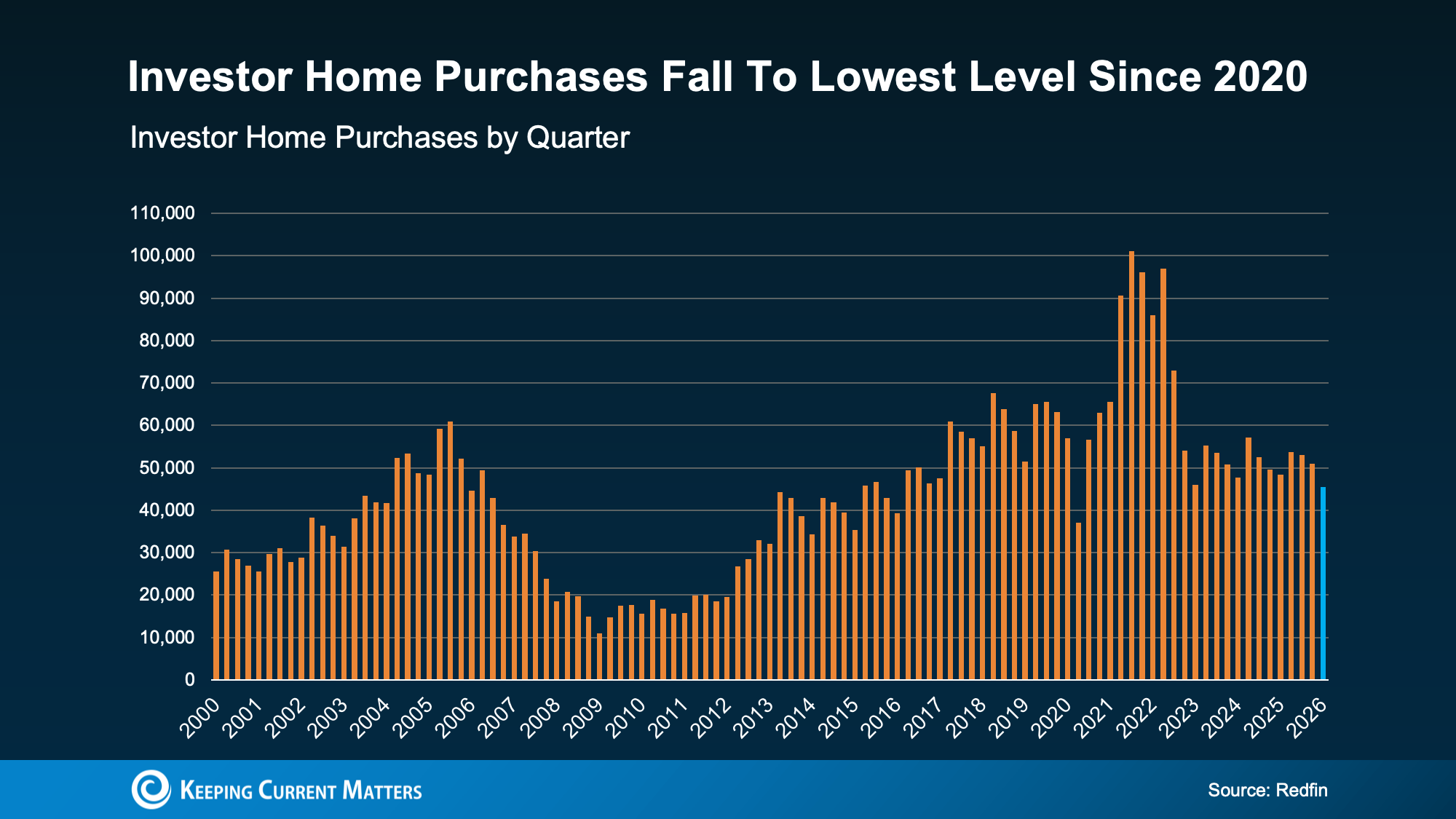
According to Redfin, investor home purchases just fell to their lowest level since 2020 – when the start of the pandemic temporarily caused pretty much all homebuying to pull way back. Before that, you’d have to go all the way back to 2016 to find a time when investors bought this few homes (see graph below):
Why the step back? Two big reasons.
First, Washington passed a housing law that takes aim at large institutional investors. To be clear, these mega investors were never as big a part of the market as the headlines made it sound. They’ve always made up a relatively small slice of housing pie. But the law still targeted the largest ones, and it worked fast. According to Thom Malone, Principal Economist at Cotality:
“When Washington announced its intention to curb institutional investors’ homebuying, the market reacted. . . Cotality data shows that investment by mega investors who own 1,000 or more properties retracted almost instantly.”
Second, the housing market has cooled. Price growth has slowed in much of the country, and in some markets, prices are dipping. That makes the math a lot less appealing for investors betting on quick gains. Lance Lambert, CEO of ResiClub, explains:
“Ever since rates spiked and the Pandemic Housing Boom fizzled out in spring 2022, institutional single-family rental (SFR) operators have pulled way back from buying up homes on the resale market—the math just isn’t as appealing right now. Home prices and rents are no longer ripping, holding costs (property taxes and insurance) have jumped, capital markets have shifted their attention elsewhere, and elevated materials prices make renovations expensive.”
They’re Not Just Buying Less – They’re Selling More
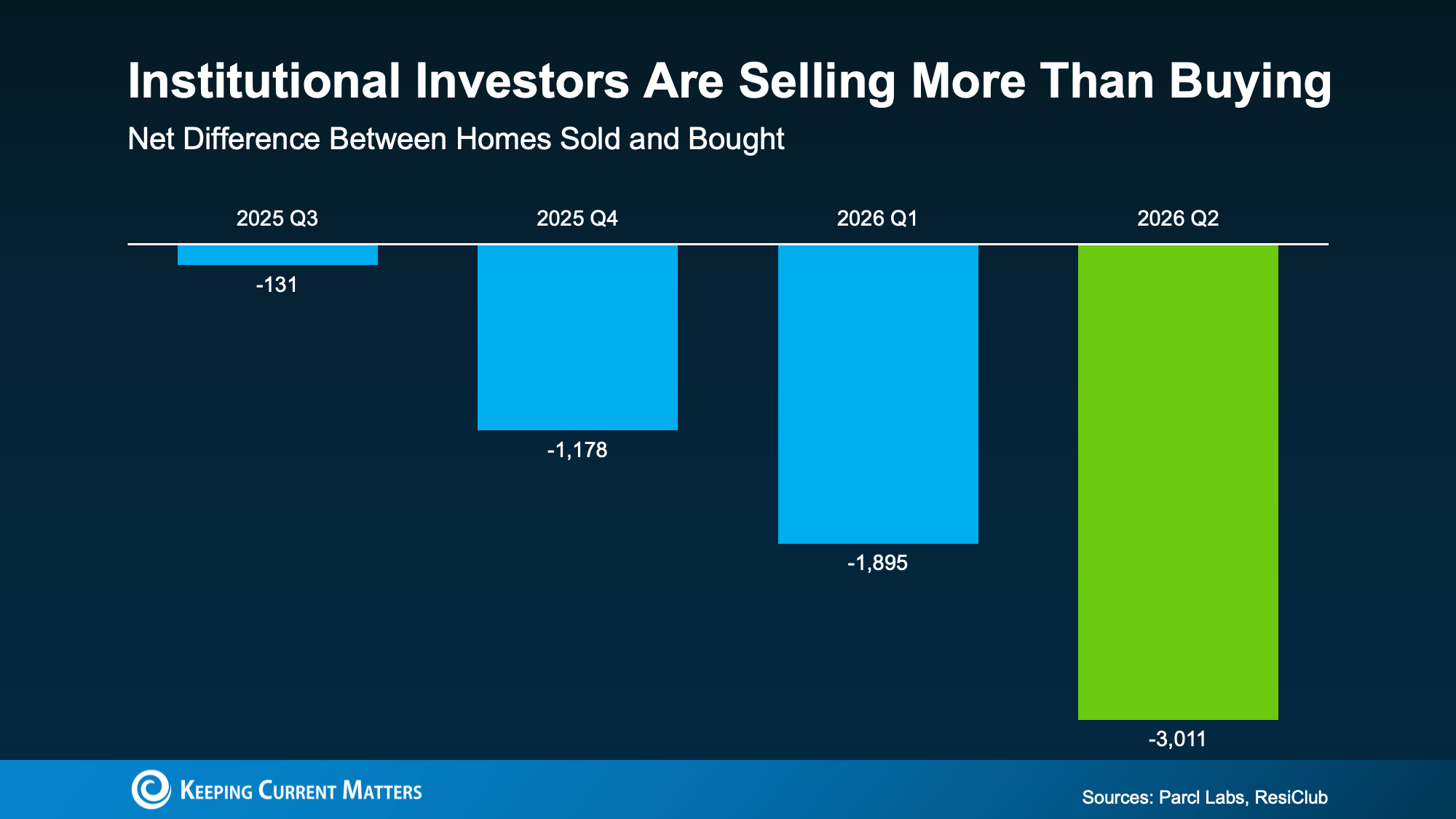
This is the part most people miss. Big investors aren’t just slowing down their purchases. Data from Parcl Labs and ResiClub shows the largest institutional investors are now selling more homes than they’re buying – and that gap is growing these past 4 quarters (see graph below):
Every one of those homes goes right back into the market for buyers like you. And since big investors tend to own homes at the lower end of the price range, a lot of what they’re selling is exactly the kind of home first-time buyers are looking for. As Malone puts it:
“. . . this sudden dropoff in institutional investment is a signal to first-time homebuyers that there’s an opening.”
Less competition from deep-pocketed buyers. More homes hitting the market. And many of them at prices that work for a first purchase. That’s a shift that works in your favor.
Bottom Line
Big investors are stepping back, and they’re adding homes to the market as they go. If you’ve been waiting for a better shot at buying, this could be it. Connect with a local agent to find out what’s popping up in your area. You may have more options than you think.
If you’re waiting for mortgage rates to fall a lot before you buy, you may be waiting a while. But before you get discouraged, there’s a number working behind the scenes that’s actually good for you right now. It’s called the spread, and once you understand it, you may see today’s rates in a whole new light.
The Pattern That’s Held for 50+ Years
For starters, mortgage rates don’t move on their own. They tend to follow the 10-year treasury yield, a number tied to how investors feel about the economy.
It’s not an exact science, since plenty of other factors can move it day to day, but broadly speaking, when the economy looks strong, that yield tends to climb over time. When the outlook gets shaky, it tends to ease. For over 50 years, the 10-year treasury yield and mortgage rates have moved almost in lockstep (see graph below):
The gap between them is called the “spread.” On average, that gap runs about 1.76 percentage points. And that spread impacts your mortgage rate. A wider spread tends to push mortgage rates higher than the treasury yield alone would suggest, while a narrower spread keeps rates closer to the treasury yield.
One of the Big Reasons Rates Likely Won’t Drop Dramatically Anytime Soon
If you’re hoping mortgage rates will drop a lot, here’s the reality – they probably won’t, at least not anytime soon. One of the big reasons why comes down to that spread between the 10-year treasury yield and mortgage rates.
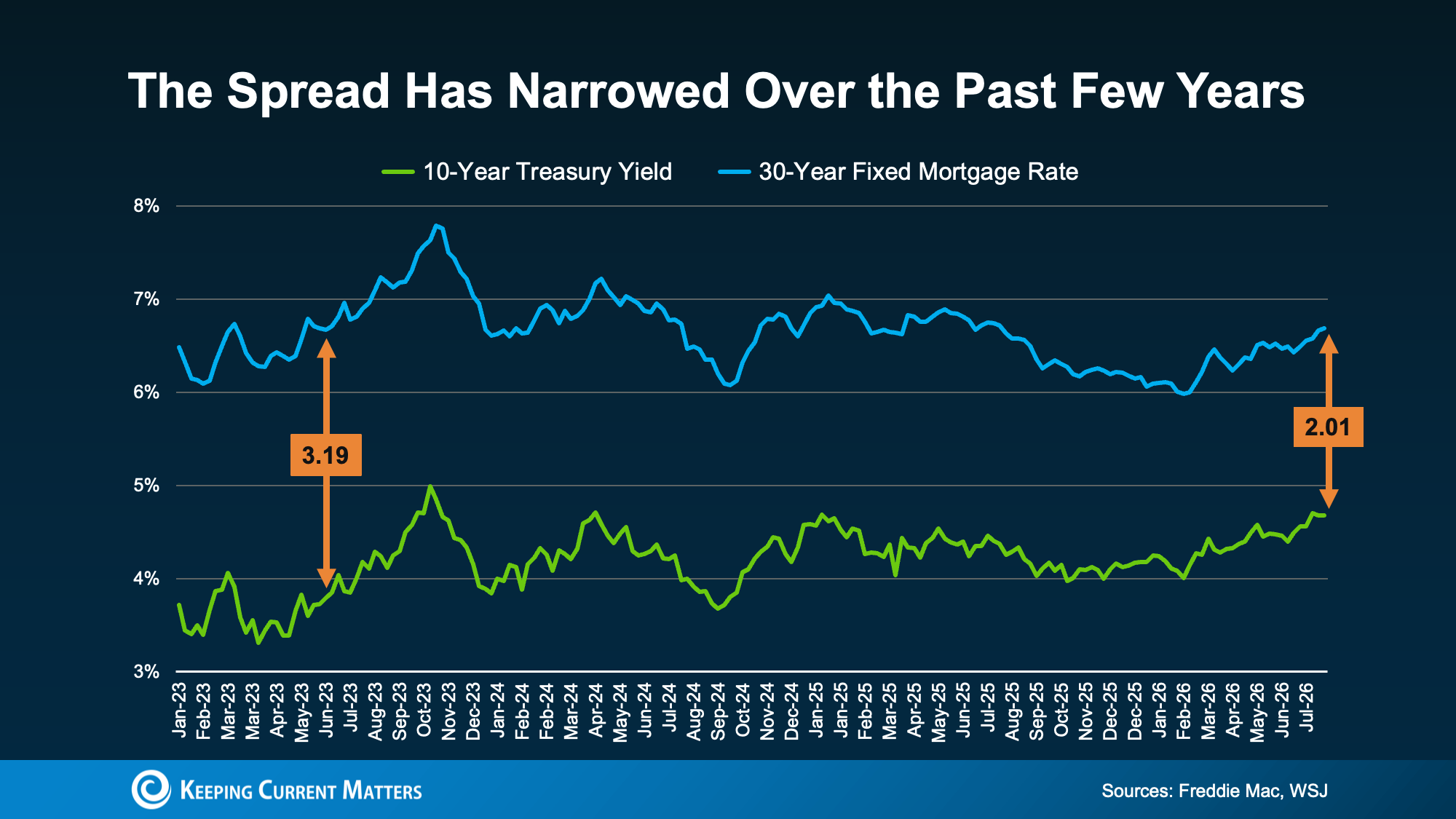
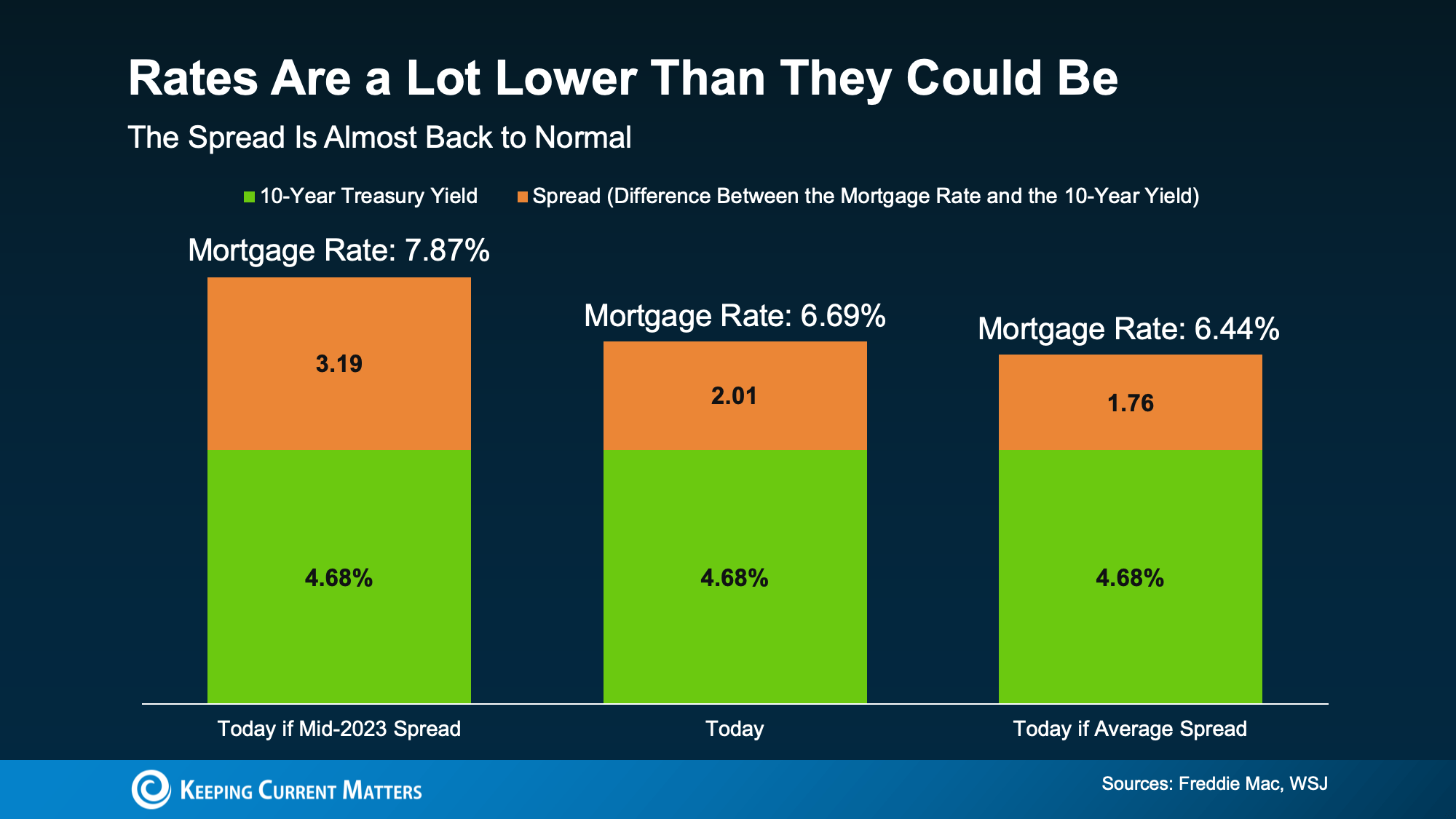
A few years ago, that gap got a lot wider as uncertainty in the economy pushed it as high as 3.19 points in 2023.
Now here’s the part worth noting – that gap has been narrowing lately. It’s down to about 2.01, just above the long-term average of 1.76 (see graph below):
When the gap is wide, there’s more room for rates to fall. But when it’s relatively normal, like it is now, there’s less wiggle room for rates to fall.
Why Mortgage Rates Aren’t Higher Right Now
Today’s mortgage rate is basically the treasury yield plus the spread. So, when either one moves, your rate moves with it. Here are 3 different rates, all built off today’s 10-year treasury yield of 4.68% to show you just how much the spread matters for your bottom line (see graph below):
If the spread were still stretched out like it was in 2023, rates would be pushing close to 8% right now. That’s because the spread was over a full point wider than it is today.
But now, thanks to the spread narrowing recently, today’s rate sits around 6.69%. That’s the middle scenario in that visual. That’s a big difference in your monthly payment compared what we could see if the spread was as big as it was 2023. As Logan Mohtashami, Lead Analyst at HousingWire, put it:
“Of course, mortgage spreads being better in 2026 is the housing hero story of the year . . .”
Now compare that middle bar to the 3rd one. If the spread were sitting at its exact long-term average, rates would be around 6.5%. That’s only about a quarter of a point away from where rates actually are today. That means most of the improvement in mortgage rates we should realistically expect from a shrinking spread has already happened.
In other words, the same narrowing spread that’s the reason rates aren’t close to 8% today is also a big reason why they’re not likely to fall a lot further.
Bottom Line
That’s the trade-off with a narrowing spread. Rates may not be where you want them, but they’re better than they could’ve been. If you want help figuring out what that means for your monthly payment, reach out to a local lender
The global real estate market in 2026 is entering a phase of stabilisation after years of volatility. This article explores key investment trends, housing demand, sustainability, and emerging opportunities shaping property markets worldwide.
Intel’s upcoming Nova Lake CPUs have been a part of the rumor mill for months as excitement builds up for a potential CES 2027 announcement. The latest leak comes from reliable tipster Jaykihn, who’s actually updating an older report that said SKUs with cut-down E-cores would also have reduced cache. Now, his new leak claims Intel will keep the L3 cache unaltered, even on chips with partially disabled E-core clusters.
Go deeper with TH Premium: CPU
(Image credit: Tom’s Hardware)
Previously, it was rumored that some Nova Lake configs, such as the 8+12+4 silicon, would only have 33MB of L3 cache since the 12 E-cores are cut down from the 16 we expect on the full-fat variant of this SKU. Now, Jaykihn reports that this config will now have 36MB of L3 cache instead, just like the uncut 8+16+4 config. Similarly, the 4+4+4 config is said to retain 18MB of L3 cache instead of 15MB, same as the fully enabled 4+8+4 SKUs.
Update:Single-cluster E-core cutdowns will retain the L3 cache configuration of the non-cutdown variant.For example:8+12+4 will have 36MB, alike 8+16+44+4+4 will have 18MB, alike 4+8+4Lower SKUs are unaffected:6+12+4 is still 30MBThis applies to Nova Lake -HX as well https://t.co/ymDQzpGmxcAugust 12, 2026
This does not apply to every SKU of Nova Lake, however. For instance, the leaker claims that the 6+12+4 config is still limited to 27MB and not 30MB, had the disabled E-core cluster retained its cache. If true, it seems there’s no linear scaling at play here; rather, Intel just decides on its own which SKUs get to keep all of the L3 cache regardless of their disabled E-cores, and which ones are still relegated to lower amounts.
Latest Videos FromTom’s Hardware
Nova Lake desktop CPUs are not the only ones reportedly affected by this change; Nova Lake-HX, the mobile lineup, is also said to follow the same methodology at this point. Therefore, we can expect some of the midrange SKUs to have more cache than previously expected. Keep in mind that all of this is preliminary, unofficial information and subject to change between now and the actual launch, as this very development proves.
Intel’s big trick for Nova Lake is expected to be the introduction of bLLC in consumer CPUs, directly meant to challenge AMD’s 3D V-Cache. Only mid- to high-end SKUs are expected to get it, including the 8+12+4 and 6+12+4 configs we mentioned earlier. They’re said to feature 132MB and 108MB of bLLC, respectively, which is separate from the native L3 cache we’ve been talking about in this story, so those numbers won’t change.
Swipe to scroll horizontally
Nova Lake-S Rumored SKUs*
SKU
Core Config (P+E+LP-E)
bLLC
L3 Cache (updated)
L3 Cache (Previous)
52 Cores (dual-tile)
(8+16)+(8+16)+4
288MB
72MB?
72MB?
28 Cores
8+16+4
144MB
36MB
36MB
24 Cores
8+12+4
132MB
36MB
33MB
22 Cores
6+12+4
108MB
27MB
27MB
16 Cores
4+8+4
–
18MB
18MB
12 Cores
4+4+4
–
18MB
15MB
*non-bLLC variants of all the single-tile SKUs are also rumored. All specifications rumored, not confirmed by Intel.
As usual, there might be some level of internal segmentation that we aren’t seeing here. Although leaked specs give us a glimpse at what Nova Lake could offer, it’s always possible that Intel is testing various configurations, even if those chips won’t end up in the main lineup.
Get Tom’s Hardware’s best news and in-depth reviews, straight to your inbox.
Our expert reviewers spend hours testing and comparing products and services so you can choose the best for you. Find out more about how we test.
Intel’s Panther Lake processors have brought powerful graphics and efficient performance to laptops. Now, mini PC companies are packing them into small desktops. With the Evo-T2 GMKtec stretches the form factor by fitting it in a spacious – for mini PCs – twin fan chassis, and equipping one of the most capable of Intel’s 18A (laptop) processors with 64GB of fast DDR5. While GMKtec calls it an AI system in its marketing, the Arc B390 iGPU and OCuLink port mean that the potential gaming capabilities are one of the big focuses for this quiet, compact, and expensive device.
Design of the GMKtec Evo-T2
The GMKtec Evo-T2 is small, of course, but is rather more portly than the typical NUC, measuring in at 6.06 × 5.94 × 2.90 inches (1.72 liters). For context, a ‘standard’ NUC like the Asus NUC 14 Essential measures 5.31 x 4.53 x 1.42 inches (0.56 liters). Its functional plastic shell is lent extra style and strength thanks to a 2 mm-thick gold-colored anodized metal shell that wraps around three sides.
I had no issues with the form or construction of the Evo-T2. I like that it has rubber feet for both horizontal and vertical orientations. There’s even a VESA mounting plate in the box, so you can attach it to the back of a monitor. If you put it behind something, it may be tricky to reach the power switch, ports, and fan-mode switch button, though.
6.06 × 5.94 × 2.90 inches (154 x 151 x 73.6 mm) / 2.07 pounds (937g)
OS
Windows 11 Pro
Price as configured
MSRP $1,959 (64GB RAM + 1TB SSD)
Ports and Upgradeability
Image 1 of 4
(Image credit: Tom’s Hardware)
(Image credit: Tom’s Hardware)
(Image credit: Tom’s Hardware)
(Image credit: Tom’s Hardware)
GMKtec has made it pretty easy to open up the Evo-T2 for servicing and upgrades. However, the 64GB LPDDR5X-8533 RAM is soldered in, and that’s the only option the company sells. If you need more RAM, you’ll need to look elsewhere.
After taking off the wrap-around metal shell by removing three of the four thumbscrew feet by hand, you get access to the four screws that hold the two halves of the plastic case together. These are mini Philips screws, nothing esoteric, and once removed, you can lift the top-half of the case away to reveal user-serviceable areas of the motherboard.
In our photos, you can see there are two M.2 2280 slots, one with a Crucial PCIe Gen4x4 1TB SSD, the other one vacant. Then there’s an M.2 2230 slot with the wireless card installed. Those offer all your internal expansion / upgrade options. Thankfully, the case top with its integrated fan and fan controller is on a decent length of connector cable, making it easy to work inside this chassis without having to detach it. I didn’t try to disassemble the system any further, but I could see that the other side of the motherboard was fitted with a laptop-style fan and blower – which exhausts at the back of the PC, beneath the device’s rear ports.
For a very compact system, the Evo-T2 offers a good selection of fast connectivity. We’ve listed the entire number and variety of ports in the specifications table above, but there is no shortage of USB Type-A ports built-in. GMKtec has also been smart to put one of the two USB4 ports front and back, as well as a 3.5 mm audio jack front and back. The system allows for four screens to be attached directly via the pair of USB4 ports plus HDMI and DP ports, simultaneously. Then there is an OCuLink port for equipment like eGPU docks.
Get Tom’s Hardware’s best news and in-depth reviews, straight to your inbox.
Lastly, two Ethernet ports are present for up to 10G wired networking. For wireless networking, there is Wi-Fi 7 on board, and Bluetooth 5.4 is also built-in – these run from an M.2 2230 card.
Productivity Performance on the GMKtec Evo-T2
Between the Intel Core Ultra X7 358H and 64GB of fast DDR5 RAM, you will have no issues with office productivity on this compact system. And this processor has the best iGPU available from Intel for accelerating certain parallel workloads too.
In our single-core CPU-stressing mini PC benchmarks suite, the Intel Core Ultra 300 chips outshined their AMD Ryzen AI 300 and 400 rivals, which is usually a good indicator for responsive performance. However, the Intel 16C/16T processors were predictably outclassed by the AMD 12C/24T chips that fill our mini PC comparison charts at this time when it comes to multi-threaded workloads.
Focusing on the Cinebench 2026 multi-core test shows that the GMKtec Evo-T2 trailed the AMD Ryzen AI pack in this popular visual rendering test. The Panther Lake machine’s score of 4,338 was respectable, but the trio of AMD competitors were between 7.5% and 17.5% ahead.
When tasked with a spot of video transcoding using HandBrake there’s a similar story to tell, but the Evo-T2 wasn’t left in the dust, as you can see. Transcoding at 16 frames per second isn’t a disastrous result when the AMD competition achieves 17 or 18 frames per second.
During our demanding tests, the GMKtec Evo-T2 stayed admirably cool and quiet.
Gaming and Graphics on the GMKtec Evo-T2
The GMKtec Evo-T2’s Core Ultra X7 358H processor includes an integrated GPU, the Intel B390, with 12 Xe cores. We’ve seen similar graphics arrangements in handhelds like the MSI Claw 8 EX AI+, so we had high hopes.
Before moving onto our standard synthetic and iconic PC gaming tests, I decided to run around in Far Cry 5 using the Normal preset, 1440p, and no resolution scaling. The game ran smoothly at the native QHD resolution of my primary monitor at a consistent 60 frames per second with the settings mentioned. I enjoyed a half-hour rampage in this open-world first person doomsday cult-combating adventure set in rural Montana.
Our set menu of gaming benchmarks include a trio of 3DMark synthetics and two popular AAA PC games. 3DMark Solar Bay is a great way to frame and compare cross-platform iGPU performance. Steel Nomad targets higher-end gaming PCs and tests raw graphics performance with its heavy GPU load. Finally, Speed Way is a 2025 benchmark from UL that uses DirectX Raytracing tier 1.1 for real-time global illumination and real-time ray-traced reflections. It is the most demanding test of the trio and mini PCs with iGPUs can currently only achieve single-digit frames per second performance in this test.
Image 1 of 2
(Image credit: Tom’s Hardware)
(Image credit: Tom’s Hardware)
GMKtec’s mini PC achieves great scores for an iGPU. For example, its Steel Nomad score of 1,624 is almost 1,000 points better than the Arctic Senza AI 370 we reviewed recently, which packs AMD’s Radeon 890M iGPU supported by a fast LPDDR5X‑8000 dual-channel memory pool.
Moving on to more real games, let’s check the data provided by the multi-scene benchmarks built into Shadow of the Tomb Raider and Cyberpunk 2077. The former scales well with processor resources and can still often look and run great on a humble iGPU. As for Cyberpunk 2077, it can really put the squeeze on even the strongest modern GPUs, so here we’ve used two settings to show how the GMKtec Evo-T2 can perform.
The Shadow of the Tomb Raider High 1080p test score shows a comfortably smooth 90 FPS on average, with the low of 72 FPS, also pleasantly above the magic 60 FPS zone. Gamers might be able to squeeze a higher quality setting or move up and enjoy this title in 1440p High. This is a pretty good effort for integrated graphics.
As for Cyberpunk 2077, the Steam Deck + 1080p preset looked very fluid with only minor drops, comfortably remaining above the 60 FPS zone. Adjusting some of the graphics settings, and even applying some level of upscaling technology, using the High 1080p preset should also easily push the GMKtec Evo-T2’s average FPS from the mid-50s to over 60 but with a clear visual advantage over using the Steam Deck preset.
Power, Heat, and Noise when using the GMKtec Evo-T2
Image 1 of 3
(Image credit: Tom’s Hardware)
(Image credit: Tom’s Hardware)
(Image credit: Tom’s Hardware)
When I left the GMKtec Evo-T2 to idle, my meter measured wattages around 13W from the wall for the whole system. In the middle of active productivity work, mixing desktop Word and having several browser tabs open, consumption increased to about 20-25W. When the system was pushed with simultaneous CPU and GPU benchmarks running, power draw seemed to peak at around 72W, measured at the wall.
System tools showed that during light activities like browsing the web and writing, the CPU temperature stayed around 44 degrees Celsius (in a 28 C room). Playing Far Cry 5 for 30 or 40 minutes, the reported CPU temperature seemed to oscillate between 80 C and 88 C. However, running a workload like Cinebench R23 multicore, the temperatures seemed to creep a smidgen higher over time, with the highest measurement I saw at 90 C.
GMKtec’s powerful Panther Lake mini PC was a quiet operator in general. My measurements from about a foot in front of the device show it runs idle at 32 dBA. Putting as much strain on the system as possible, with multiple heavy CPU and GPU tasks, the loudest volume the fans reached was 38 dBA. I didn’t find the fans to be irritating. Even at the loudest levels, the sound produced is a kind of low-frequency hum.
Software and Warranty on the GMKtec Evo-T2
The GMKtec Evo-T2 ships with Windows 11 Pro installed. Customers are warned by GMKtec’s stickers over the Ethernet ports not to connect to the internet on first boot. This may help in avoiding some long update times and let you get straight to using your new device.
GMKtec includes AI and LLM software preinstalled. A PDF on the desktop alongside several utilities guides you through selecting some local LLMs, downloading, and installing them.
The first step was to run a pre-installed utility called Herdsman, which is where you pick some LLMs based on the software recommendations for different tasks. It also offered summaries of the chosen model’s response speed, capabilities, and memory use. Straight away I hit a slight roadblock with certain pages / dialogs popping up in Chinese. With Google Translate on mobile, I managed to navigate this, but it isn’t ideal.
With the model downloads complete, I could now test out the pre-installed AIPC and GMKtec Claw software. My initial test queries were run using the Alibaba-developed Qwen3.6-35B-A3B / Balanced model. This hogged a little over 27GB of my memory, according to Windows, so the 64GB system total seemed well chosen for this LLM. Responses from queries were not slow, with metrics reporting an average Prefil speed of 500+ t/s, and Decode of 30 t/s. When asking it to “write a 500-word essay on the history of computing,” it finished in 26 seconds. Watching the Windows system monitor when Qwen was busy showed that it solely relied on the GPU (using 90-95% utilization) for acceleration. The NPU was completely untaxed, and the CPU’s low ~10% utilization was probably mostly due to background tasks and housekeeping.
Other prompts I tried demonstrated that local AI was just as capable as online models at being totally wrong about a subject. Then, the agentic AI app also underwhelmed by failing in a pretty simple task I asked it to complete – checking an airline booking given the reference number.
Using Zimage Turbo (10.86GB) to generate 1,024 x 1,024 pixel images from prompts resulted in a wait of just over 20 seconds for each result. Again, this used the GPU.
These GMKtec-supplied tools may have potential, but the supplied software suite suffers from partial translations and fewer chat, reasoning, and coding models available than if you just went and downloaded the well-known LM Studio. (However, LM Studio users would also need something like ComfyUI to set up image generation models they wanted to use.)
GMKtec sells the Evo-T2 with a one-year warranty.
Configurations of the GMKtec Evo-T2
We tested the GMKtec Evo-T2 with Intel Core Ultra X7 358H, 64GB RAM, and 1TB SSD, which is listed at $1,959 on the firm’s US site. That chip is one of the best Panther Lake mobile processors with its 16C/16T CPU tile (4x P‑cores, 8x E‑cores, 4x LP E‑cores) running at up to 4.8 GHz. This is aided by Intel Arc B390 (12 Xe cores), which is muscular for an iGPU. Another section of the SoC features a dedicated NPU capable of 50 TOPS, says Intel. However, GMKtec likes to highlight that the total AI power of this Intel processor is 180 TOPS
GMKtec sells just two Evo-T2 configurations in the US, and both have 64GB LPDDR5X-8000 memory. There are two M.2 SSD slots inside, and the manufacturer provides a 1TB Crucial E100 PCIe 4×4 drive using Micron 176-layer QLC NAND pre-installed in the device we received. Windows 11 Pro is included, as are the aforementioned GMKtec local LLM software tools.
We reviewed the Evo-T2 in its $1,959 configuration with 64GB of RAM and a 1TB SSD. On the U.S. web store, there is just one other configuration, a model with the same tech specs but with an “853GB AI SSD” (Phison aiDAPTIV+) instead of the regular 1TB SSD, with an MSRP of $2,399.
Customers ordering an Evo-T2 from the U.S. are told that they won’t have to face any additional import fees, though the store suggests that you should order now because price hikes are coming.
Bottom Line
GMKtec wants to call this an AI machine, and the 64GB of RAM certainly helps towards its local LLM aspirations. But the software it preloads for local AI needs more polish. I’d say that the GMKtec Evo-T2 is far from a one-trick pony, though, and I enjoyed using it as my daily driver for a few weeks.
This mini PC easily handled all the productivity workloads I threw at it. Gaming was excellent for an iGPU – and probably only the aforementioned Ryzen AI Max+ 395 APU with Radeon 8060S graphics does better in a single package. Also, this machine is compatible with one of the best eGPU interfaces available, OCuLink, for connecting a desktop GPU of your choice if and when you feel the need. Many enthusiasts still find this interface works better than Thunderbolt 5 or USB4 v2.
GMKtec’s Evo-T2 is a quiet-running mini PC showcasing one of the best Panther Lake chips in the Core Ultra X7 358H. Having 64GB of fast memory on board feels like something of a luxury in the current climate. However, the $1,959 MSRP is just $40 less than the 64GB version of the GMKtec Evo X2 AI Mini PC with Ryzen AI Max+ 395, with integrated Radeon 8060S graphics that we reviewed in February (was $1,499, but now $1,999 with “price increase coming soon”).
If you’ve ever stumbled upon the Amazon CPU best sellers list over the past few years, you’ve been greeted by a wall of red boxes. This list isn’t a good source of data, without hard sales figures and heavily skewed toward what’s available on Amazon at any given time. But AMD senior marketing director Saša Marinković recently shared a screenshot of the Amazon CPU best-sellers list, bragging on AMD’s representation. The interesting bit is that the screenshot Marinković shared shows the $80, DDR4-based Ryzen 5 5500 at the top of the charts.
Go deeper with TH Premium: CPU
(Image credit: Tom’s Hardware)
The Ryzen 7 9800X3D has since reclaimed the top slot — it is the best CPU for gaming, after all — but the screenshot touches on the prevalence of DDR4 platforms, nearly four years after the launch of Zen 4 and introduction of DDR5 to AMD’s platform. It’s not just the Ryzen 5 5500, either.
Of the 25 best sellers on Amazon, three slots are occupied by Intel, and one slot is claimed by the Thermal Grizzly AM5 contact frame. AMD holds every other slot, though it’s nearly an even split between DDR4 and DDR5. There are nine Zen 3 CPUs on DDR4 platforms to 12 Zen 4/5 CPUs on DDR5 platforms.
Latest Videos FromTom’s Hardware
It seems Marinković’s screenshot is a bit out of date — currently, the split is even closer, with Intel picking up two extra spots and the split between DDR4 and DDR5 AMD CPUs moving to nine and 10 slots, respectively.
Top 25 best selling CPUs on Amazon. @AMD pic.twitter.com/M702qXc1J1August 10, 2026
The irony here is that Marinković is highlighting AMD’s representation on the best-sellers list while a four-year-old CPU is at the top of the charts, not one of the many performant DDR5 processors AMD has released since. It’s not hard to draw a straight line between DDR4 popularity and current RAM pricing on your own. However, several motherboard vendors have previously confirmed to Tom’s Hardwarethat they’re increasing DDR4 motherboard production due to demand for older platforms.
The Ryzen 5 5500 is one of the cheapest CPUs you can buy at only $80, and it comes with a Wraith Stealth cooler in the box, saving you some money on an aftermarket CPU cooler. It’s based on the Zen 3 architecture with six cores and 12 threads and boosts up to 4.2 GHz. It has a cut-down L3 cache compared to other Zen 3 CPUs at 16 MB, however, and it tops out at PCIe 3.0.
We recently published a $100 CPU shootout comparing the Ryzen 5 5500 to some other options around the same price and found its performance lacking, particularly in games; the Intel Core i3-14100F consistently offered better performance with DDR4. That conclusion only holds up if you don’t already have an AM4 motherboard, however. If you’re in the market for the Ryzen 5 5500, you’re already on a tight budget, so a new motherboard probably isn’t in the cards.
Get Tom’s Hardware’s best news and in-depth reviews, straight to your inbox.
If you’re planning to buy your next home soon, you’ve probably heard the old rule about saving 20% for your down payment.
The truth is, you usually don’t have to. Plenty of loan options let qualified buyers put down much less. But a lot of repeat buyers are choosing to put down 20% anyway.
So, why are they if they don’t have to?
Two reasons. They know a bigger down payment pays off, and after years in their current house, they’ve built up enough equity that it’s finally possible.
Repeat Buyers Put More MoneyDown
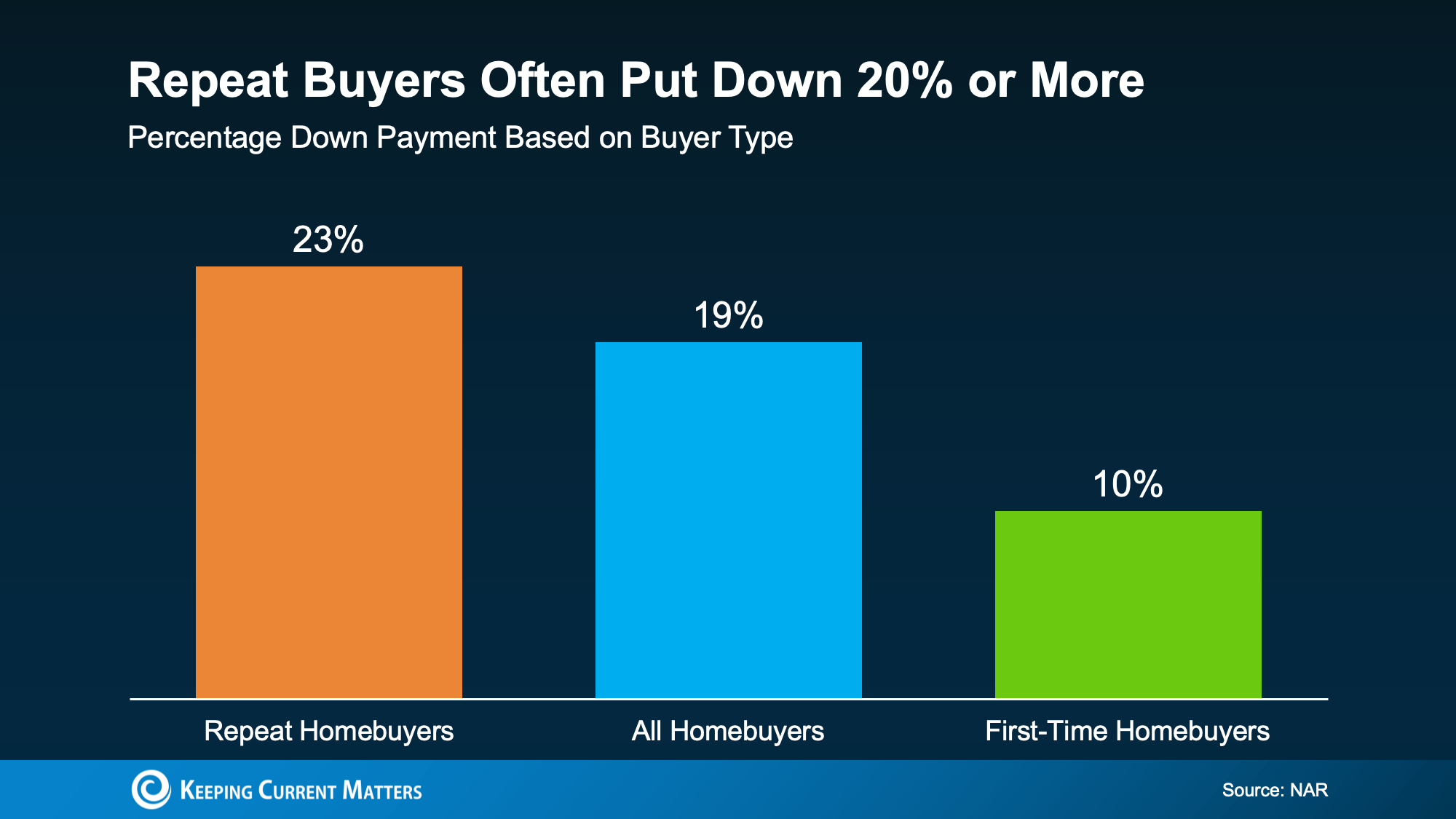
According to the National Association of Realtors (NAR), the typical repeat buyer puts down 23%when they buy a home (see graph below):
That’s more than double the 10% they may have put down as a first-time buyer. So, how do they manage it? Their equity.
When you’ve owned a house for a while, two things tend to happen. One, you pay down your mortgage, and two, your home’s value climbs. The difference between what you still owe on your mortgage and what your house is worth is your equity. And the longer you’ve lived in your house, the bigger that number grows.
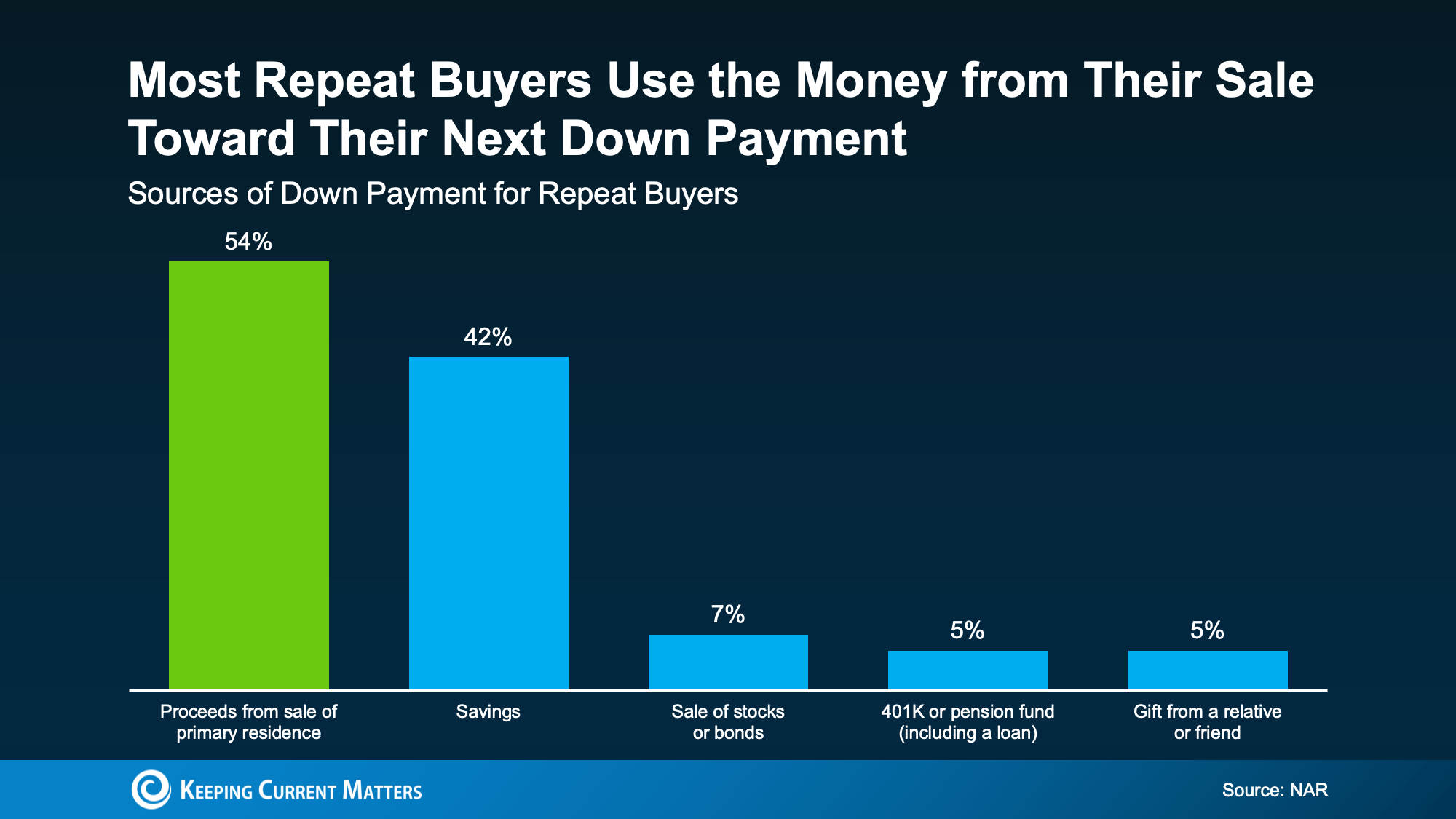
When you sell, your equity turns into cash. And NAR data shows most repeat buyers put it straight toward their next down payment (see chart below):
First-time buyers don’t have that springboard yet, and that’s normal. But if you already own, you may be holding more buying power than you think because of it.
And if putting 20% down is finally possible, it may be worth at least considering. Here’s why. Let’s go over what you get in return.
4 Perks of Putting 20% (or More) Down
As Redfin explains, putting more down pays off in a few ways:
A smaller monthly payment. The more you put down, the less you borrow at today’s rates. And if taking on a higher mortgage rate is one of the reasons you’re debating whether to move, that’s a win.
Paying less interest. A smaller loan can also carry less interest across the life of your mortgage. If you put 20% down, you’ll only pay interest on the remaining 80%. Put 5% down and you’ll pay interest on the remaining 95%, which will cost you more over the lifetime of the loan.
No private mortgage insurance (PMI). When you put down less than 20% on a conventional loan, lenders usually add a monthly fee called private mortgage insurance. With 20% down, PMI isn’t required and that saves your money every month.
A stronger offer. A larger down payment can make your offer more attractive, since sellers tend to read it as a sign your financing is solid and the deal is more likely to close.
Bottom Line
So, no. You don’t need to put 20% down to buy your next home. But you may want to. If your equity puts it within reach, going bigger can lower your costs and make moving more doable than you think – even with today’s rates.
A trusted lender can run the numbers on your financing, and a local agent can help you figure out what your current house could add to your next down payment.