Emergency Fund 101 – A Realistic Savings Plan


Most people know they need an emergency fund. Few people have one that can survive a real crisis. A cracked laptop screen, a sudden medical bill, or a few weeks without pay can turn into a financial spiral. The reason is simple: there was no cushion in place.

The good news is this: you do not need a high income to build one. You need a plan that fits your life, and a clear reason to follow it.

This guide covers what an emergency fund is for, how much you need, where to keep it, and how to build one on a tight budget.

What an Emergency Fund Is For

An emergency fund covers costs that are sudden, urgent, and needed. A holiday sale is not an emergency. A leaking roof is. A new phone because the old one feels outdated is not an emergency. A phone that breaks and is needed for work is.

This money stops sudden costs from turning into debt. Without a fund, one bad month can push you toward credit cards or loans with high interest. That debt often outlasts the emergency that caused it.

An emergency fund also changes how you handle stress. People with a buffer make calm choices when something goes wrong. Without one, every bill feels like a crisis. With one, the same bill becomes a task. You handle it and move on.

Think of the fund as a shock absorber. It does not stop bumps in the road. It just stops them from breaking the car.

How Much You Need

The standard advice is three to six months of basic costs. That target is useful, but it can feel out of reach when you start from zero. A better plan is to break it into stages.

Stage one: a starter fund. Save a few hundred dollars to cover small problems like a car repair or a broken appliance. This stage stops minor issues from landing on a credit card.

Stage two: one month of costs. This covers rent, bills, food, and transport for a full month. Once you reach this stage, a missed paycheck will not cause a crisis right away.

Stage three: three to six months of costs. This is the full safety net. It covers job loss, a long illness, or a major cost you did not see coming. If your income changes month to month, aim closer to six months.

Work through the stages in order. Reaching stage one in a few weeks builds more drive than waiting years to hit stage three.

Where to Keep the Money

Keep the fund somewhere you can reach, but not somewhere you touch every day. A regular checking account makes it easy to spend the fund without noticing. A retirement account locks it away with fees, which defeats the point.

A separate savings account works best. Pick one that pays some interest if you can. Keeping it apart from daily spending makes it easier to leave alone. Some people use a savings account at a different bank. This adds a small gap between the money and a debit card at checkout.

Build the Habit, Not Just the Balance

The habit matters more than the amount at the start. A fixed transfer on payday, even a small one, beats deposits made only when money feels spare.

A few methods that work:

Automate the transfer. Move money into the fund the same day your income arrives. Treat it like a fixed bill. This removes the need for willpower.

Start small. A transfer that feels too small to matter is easier to keep up than one that strains your budget. Steady deposits build the fund faster than a burst of effort that stops after two months. Small and steady wins over big and short.

Redirect windfalls. Put tax refunds, bonuses, or gifts toward the fund, since these amounts were never part of your regular budget. Even half of a windfall moves the fund forward without touching daily spending.

Cut one recurring cost. Check your subscriptions and memberships. One unused service, once cancelled, can fund a steady monthly transfer without any change to your daily life.

Track your progress. Use a spreadsheet or a savings app to watch the balance grow. Progress you can see is easier to stick with than progress that stays in your head.

Mistakes That Slow You Down

A few habits tend to slow progress, even with good aims.

The most common mistake is spending the fund on non-emergencies. Once it covers a trip or a sale, it stops working as a safety net. The next real emergency finds an empty account.

Waiting for extra money before you start is another mistake. Emergency funds grow through steady habits, not through a perfect moment that rarely shows up.

Putting the fund in stocks or other risky assets is a quieter mistake. This money needs to stay stable and easy to reach. A market drop at the wrong time can shrink the fund right when you need it.

Chasing a full six-month target before you deal with high-interest debt can also backfire. In many cases, a small starter fund paired with steady debt payments works better than a large fund sitting next to growing interest charges. Pick the path that clears the most costly debt first, then build the fund back up.

Rebuild After You Use It

Using the fund is not a failure. It is doing its job. What matters next is the rebuild. Restart the automatic transfer right away, instead of waiting for a better time. This keeps the habit alive and stops the fund from sitting empty for months.

Write down what the money went toward. Over time, this record shows which costs count as real emergencies. That makes future plans more exact and cuts down on guesswork.

Treat the rebuild like the first climb. Start with a small, steady transfer, and let the balance grow one deposit at a time.

Final Thoughts

An emergency fund is not about hitting a perfect number. It is about the calm it gives you. It turns a sudden cost from a crisis into a task you handle and move past.

Start small. Automate the process. Keep the fund apart from daily spending. These steps turn a good aim into a safety net. You can count on it when life takes a sharp turn.



Source link

Player builds working AI chatbot in vanilla Minecraft using 445K command blocks — clever approach shrank initial block count from over 1 million, requires no mods, plugins, or datapacks to work


Anyone who’s played Minecraft for a while is familiar with community creations like in-game graphing calculators, QR code generators, and Tetris games built using command blocks, mods, and far too much free time. Building AI tools is a logical next step, and several complicated projects have arisen in that vein using redstone. Reddit user Objz, however, implemented an LLM using only 445,782 command blocks and no mods, plugins, or datapacks. By its creator’s description, the project was “a headache.”

Objz’s LLM isn’t actually that large. It only has a 64-dimensional embedding space, a 256-neuron hidden layer, and a tiny vocabulary of 2,048 words, and was trained on 11,118 DailyDialog conversations. Users can talk to it using the game’s “/dialog” functionality, and the output stream comes back one word at a time, as with typical chatbots.


Source link

Memory prices climb 500% in 12 months, up to 10x the lowest ever tracked prices — 128GB of DDR5 now $3,399


We’re officially in dire straits. There’s almost no way, if you’re reading this site, that you aren’t aware that memory prices have become entirely divorced from reality. Some are calling it the RAMpocalypse; I prefer “RAMageddon.” Whatever you want to call it, though, the reality for PC builders right now is just grim. To put this in perspective, just take a look at our RAM price tracking post:

Swipe to scroll horizontally

Memory Kit

Best U.S. Price

Lowest-Ever U.S. Price

DDR5-5200 16GB

$239

$52

DDR5-5600 16GB

$214

$199

DDR5-5600 32GB

$394

$72

DDR5-6000 16GB

$239

$197

DDR5-6000 32GB

$392

$72

DDR5-6000 48GB

$689

$144

DDR5-6000 64GB

$849

$159

DDR5-6000 96GB

$1,799

$189

DDR5-6400 128GB

$3,399

$329

DDR5-6600 32GB

$637

$158

That’s right: 128GB DDR5 kits are fully ten times more expensive than the lowest price we’ve ever seen. Things improve as you step down the memory capacities and speed tiers, but not as much as we’d like. You’re still looking at $392 for a memory kit that was just $72 last year.


Source link

The Kind of House Buyers Are Willing To Pay More For


That spare room on the main floor. The finished basement with a kitchenette and its own entrance. The bonus room you’ve been using for storage.

To you, it’s extra space. But to a growing pool of buyers, it’s the reason they’d pick your house. Here’s why. Multi-generational homebuying is on the rise.

Millions of Families Are Living Multi-Generationally

The number of multi-generational households is climbing. That’s when 3 or more generations live under one roof. And data shows those households grew from 3.2 million to almost 4 million between 2014 and 2024, according to Realtor.com.

And each year, more people are shopping for a larger home that fits their combined needs.

While the appetite for this type of house is rising across the board, data from USAFacts shows multi-generational living is more common in some states than others. The darker the state in the map below, the more common it is in that area (see map below):

a map of the united states

Where does your state fall? Depending on where you are, the pool of buyers looking for a house like yours could be even bigger than you’d think. But the overall bottom line is this.

There’s a real market out there for larger homes with room for multiple generations under one roof, especially since affordability is still so tight. And if you own a house like that, it’s in demand.

Multi-Generational Houses Sell at a Premium

And that extra room carries real value with the right buyer. According to Realtor.com, in 2025 the median asking price for a multi-generational house was $709,000 – roughly 65% higher than the $429,900 median for a standard house.

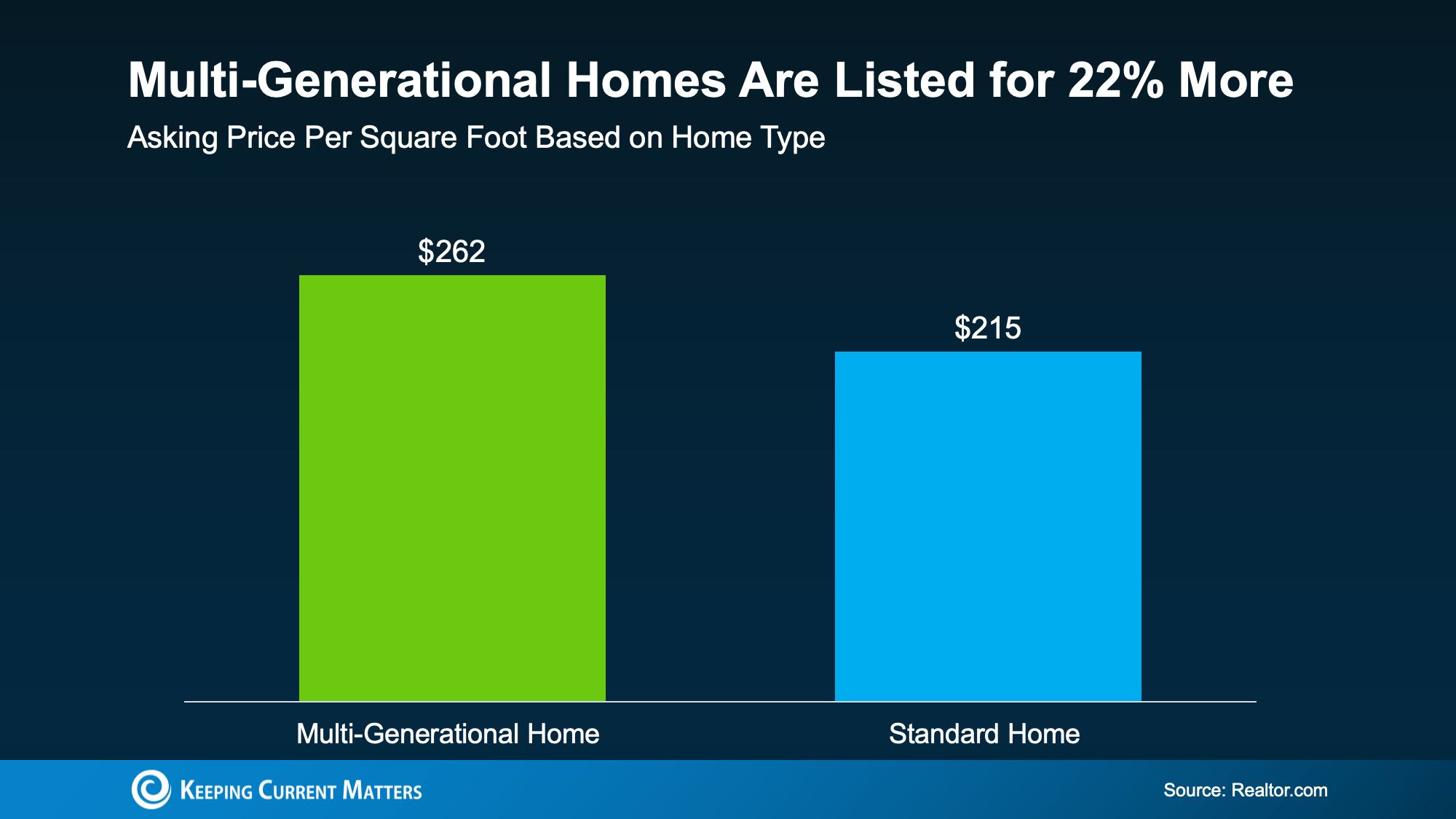
Some of that is simply size. But compare multi-generational homes to regular homes with the same amount of square footage, and they still come out on top – $262 per square foot versus $215.

That’s a 22% premium you could command for special features like in-law suites, second kitchens, and separate entries (see graph below):

a graph of a home sales

When you sell, this could help you walk away with more money in your pocket, especially when your agent highlights your home’s multi-generational-friendly features in your listing.

And Buyers Aren’t Getting Sticker Shock

And even with slightly higher price tags, buyers aren’t flinching. Multi-generational houses drew 13.5% more online views than standard ones, and they still sold just as fast – in about 59 days – per the same Realtor.com report.

Hannah Jones, Senior Economic Research Analyst at Realtor.com, explains:

“The strong demand and steep premiums we are seeing in inventory-constrained markets point to a real mismatch between what buyers are looking for and what is actually available. For sellers in these markets, this type of home can be a significant asset.”

Basically, when buyers want something that’s very specific, the house that checks the box tends to stand out.

Bottom Line

Your multi-generational-friendly, or simply larger-than-average, house might meet criteria a lot of buyers can’t find in a standard one. That’s what gets attention. And offers. So, talk to a local real estate agent about what it could get you in your market right now.


Source link

Dell CEO unveils new ‘Dude, you’re getting a Dell (AI server rack)’ video — PC maker recycles famous PC ad campaign to tout its new AI data center products


Dell has created a humorous 2026 update to its iconic early-2000s “Dude, you’re getting a Dell” series of commercials. Company CEO Michael Dell shared a brief new 10-second commercial this weekend, which shows the Dell Dude (basically a Ben Curtis-alike), gleefully opening the garage door, ready for his shiny new Dell AI rack to be delivered, which is then dropped in his yard from a crane.

The revamped AI era ‘Dude, you’re getting a Dell’ commercial can be seen by expanding the tweet above.


Source link

This portable, external CD/DVD drive comes with a 2.5-inch SATA and an SD Card slot for just $26 — Save 10% on a modern essential for keeping physical media alive


As the AI boom consumes everything tangible around us, it’s even more important to keep physical media alive. Since our current tech isn’t equipped to interface with these relics, an external disc drive is a great investment to access your collection. Alronly makes a great CD/DVD player that also comes with a 2.5-inch SATA and SD Card slot, along with standard USB ports, for just $26.99 on Amazon.

This drive is absolutely packed with features for the price. It can read and write CDs at a blazing-fast 24X, or at 8X speeds for DVD. It also acts as a USB hub and a SATA-to-USB adapter. You can use the 2.5-inch SATA slot for either a hard drive or an SSD. It provides easy-to-reach access to a full-size SD card slot, microSD slot, 2x USB-A ports, and USB-C — both of those are promised to be USB 3.0 with 5 Gbps speeds.

Alrony says this USB attached device is compatible with Windows XP, 7, 8, and 10, as well as a wide gamut of Linux and MacOS computers. It’s a true plug-and-play device that doesn’t require downloading any drivers, making it very suitable for older family members that consider you tech support. Just don’t expect to use it with your iOS, Android, or ChromeOS device; they are specifically stated to be incompatible.


The include cable for data/power has both a USB-A and USB-C connector. Meanwhile, the drive also includes another USB-C port for dedicated power, which may be useful in case your chosen system’s data port is not up to scratch in power delivery terms. The device is also quite sleek, measuring just 0.9 inches thick and weighing only 0.75 pounds with an all-black aesthetic that would fit basically anywhere.

While CDs and DVDs don’t hold a candle to Blu-Ray, the best physical media standard we have today, they still hold an important place in history. Even if you don’t have any special memories stored in old discs, you can use this external drive to put new ones on there. For just $26.99, this is a great tool to have by your desktop that can still be put to good use when it’s not reading or writing to optical media.

If you’re looking for more savings, check out our Best PC Hardware deals for a range of products, or dive deeper into our specialized SSD and Storage Deals, Hard Drive Deals, Gaming Monitor Deals, Graphics Card Deals, Gaming Chair, Best Wi-Fi Routers, Best Motherboard, or CPU Deals pages.


Source link