Only one piece of it is new: the Bravera SC6 PCIe 6.0 SSD controller, which samples in Q4. Structera X has been shipping since 2024, the Structera S switch was announced at OFC in March, and the Photonic Fabric optical memory tier came with the Celestial AI acquisition in February. Meta, the reference customer for the use case Marvell is selling, did it with an ASIC of its own design rather than anything from Marvell.
What’s new (and what isn’t)
The Bravera SC6 is a PCIe 6.0 x4 controller with 16 NAND channels, eight chip enables per channel, a 3,600 MT/s ONFI and Toggle interface, and 12 Arm Cortex-R82 cores plus three Cortex-M7s, according to Marvell’s product blog.
Latest Videos FromTom’s Hardware
Marvell says it doubles the Bravera SC5, supports NAND from multiple suppliers, and uses a host-managed flash translation layer, meaning cloud operators control write placement, garbage collection, and wear leveling themselves, with KV cache spillover from HBM to SSD as the primary workload. Sampling starts in Q4 2026, which puts drives in 2027 at the earliest on the timeline Tom’s Hardware Premium laid out for the PCIe 6.0 controller field, where Phison and Silicon Motion are chasing the same Gen6 drive launches.
Structera X 2404 and X 2504, the DDR4 and DDR5 expansion controllers, were announced in July 2024, and Marvell’s FMS blog says both are in hyperscaler deployments, with inline LZ4 compression that Malik told EE Times yields roughly 2 to 2.5 times the effective capacity.
The Structera S 30260 switch, announced at OFC in March, carries 260 PCIe 6.0 and CXL 3.x lanes, connects 16 or 32 CPUs or GPUs to up to 48TB of shared memory at 4 TB/s aggregate bandwidth and under 460ns round trip, and begins sampling this quarter. Photonic Fabric came in with the $3.25 billion Celestial AI acquisition that closed in February, with Marvell now describing it as a shared-memory tier reaching up to 50 meters with up to 32 TB of warm KV cache and a claimed 2 to 3 times token throughput inside existing footprints. Marvell also took a $2 billion investment from Nvidia in March, tied to NVLink Fusion, the proprietary scale-up fabric CXL pooling has to sit alongside.
DRAM contract prices have tripled since Structera launched
Conventional DRAM contract prices rose 90% to 95% quarter-on-quarter in Q1 2026, the steepest increase on record for every DRAM category. Q2 added another 58% to 63%, and server DRAM is set to climb a further 13% to 18% in Q3, held in check mainly by the long-term agreements U.S. hyperscalers signed to cap pricing through 2027 and 2028. Server DRAM buyers in the U.S. and China were receiving about 70% of their orders late last year as suppliers diverted wafers to HBM.
Samsung, SK hynix, and Micron have all been winding down DDR4 output since last year, and TrendForce put the legacy memory rally at up to 50% for DDR4 in Q1 alone. A module pulled from a decommissioned 2021 server is now worth a multiple of what it was when Structera X was announced, and the DDR5 that would replace it has roughly doubled in price twice. When Marvell first pitched DDR4 reuse in 2024, it was a sustainability line item, but two years later, the memory crunch has turned it into a capex line item.
Meta’s Vistara ASIC, presented at ISCA 2026 in late June, is a CXL 2.0 Type-3 expander on a PCIe 5.0 x16 link that bridges two DDR4 channels to a host and runs at 128GB per chip using 32GB modules recovered from retired machines. Each MemServer pairs a 158-core AMD EPYC Turin with 768GB of local DDR5-6400 and 256GB of CXL-attached DDR4-2400, and Meta claims idle round-trip latency of around 50ns on the controller path.
The paper states that around 40% of Meta’s fleet is memory-capacity bound, that its servers last three to five years while the DRAM inside them is good for seven to 10, and that the deployment cuts server counts by up to 25% for disaggregated ML inference, average latency by 29% for distributed caching, and job failures by 33%, The Register from the paper ahead of the talk.
Malik told EE Times, “The first and foremost important use case within CXL is the recycling of DDR4,” and Marvell’s FMS release says Structera X was “developed in close collaboration with leading hyperscalers” without naming one. Meta’s paper describes an in-house ASIC, an in-house MemServer chassis, and an in-house Linux page-placement stack, the full path one would take when volume justifies its own silicon, while Astera Labs’ Leo controllers reached Microsoft Azure’s M-series preview in November last year.
CXL’s deployment gap
SemiAnalysis declared CXL dead for AI in March 2024 because Ethernet-style SerDes such as NVLink carry roughly three times the bandwidth per millimeter of die edge as PCIe 5.0 or 6.0, so every CXL lane on an accelerator costs scale-up bandwidth that could have gone to the GPU-to-GPU fabric instead.
Marvell’s CXL pitch accordingly targets CPU-side capacity and KV cache staging rather than the GPU-to-GPU path where you’ll find NVLink Fusion. Yole estimated two-thirds of servers sold in Q1 2025 were CXL-capable and expects more than 90% to be by the end of this year, yet it puts the share of servers actually using CXL at close to zero today and only 13% by 2030.
Marvell’s benchmarks for the Structera S show a 16TB pooled DRAM tier delivering 4.8 times the inference throughput and an 82.7% cut in time to first token in GPU configurations, attributed to keeping KV cache in DRAM instead of recomputing or reloading it. Those are vendor numbers with no disclosed model or baseline, and the switch only starts sampling this quarter. Nvidia, AMD, and the SSD makers all offer their own routes for the same cache spillover.
You may have heard the number of homes for sale isn’t growing like it was. And maybe that has you worried you won’t find a home you love when it’s time to make your move.
But that may be about to change. Here’s why your pool of options may actually start ticking back up again.
Growth Has Slowed, But It Hasn’t Stopped
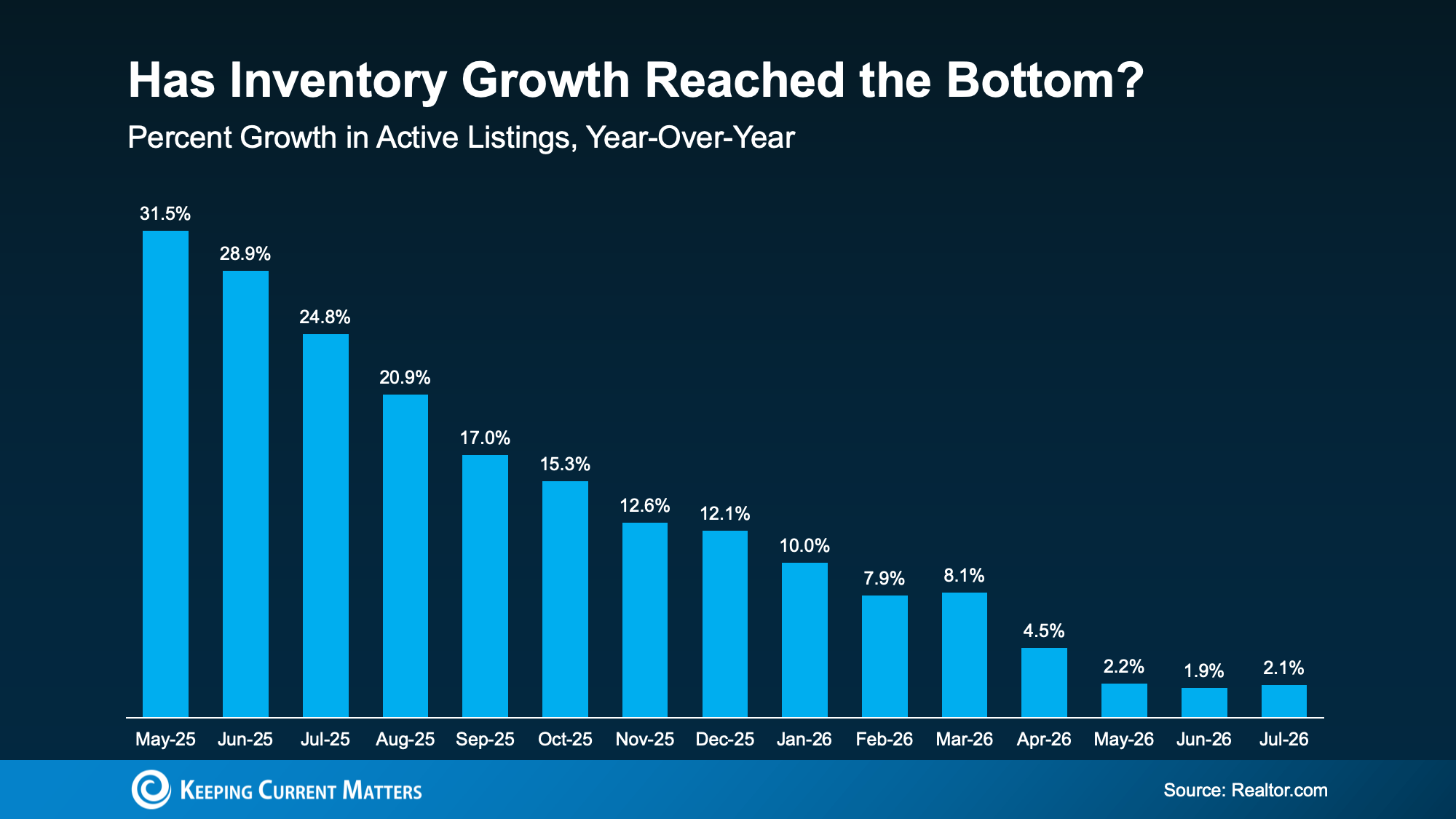
Active listings were up 2.1% year-over-year in July, according to Realtor.com. Back in January, inventory was up 10%. And in May of 2025, it was up 31.5%. So, growth has cooled off a lot over the last year.
The past 3 months, though, have all seen inventory growth land in roughly the same range, which is a sign this slowdown may be nearing its floor (see graph below):
So, what does that mean for you?
Homes are still coming onto the market. Every single one of these bars shows a period where inventory grew. So, don’t be discouraged or let this make you think you’re out of options. Plus, we’ve seen more stability in the numbers lately, which is a good sign.
The Most Homes for Sale Since 2019
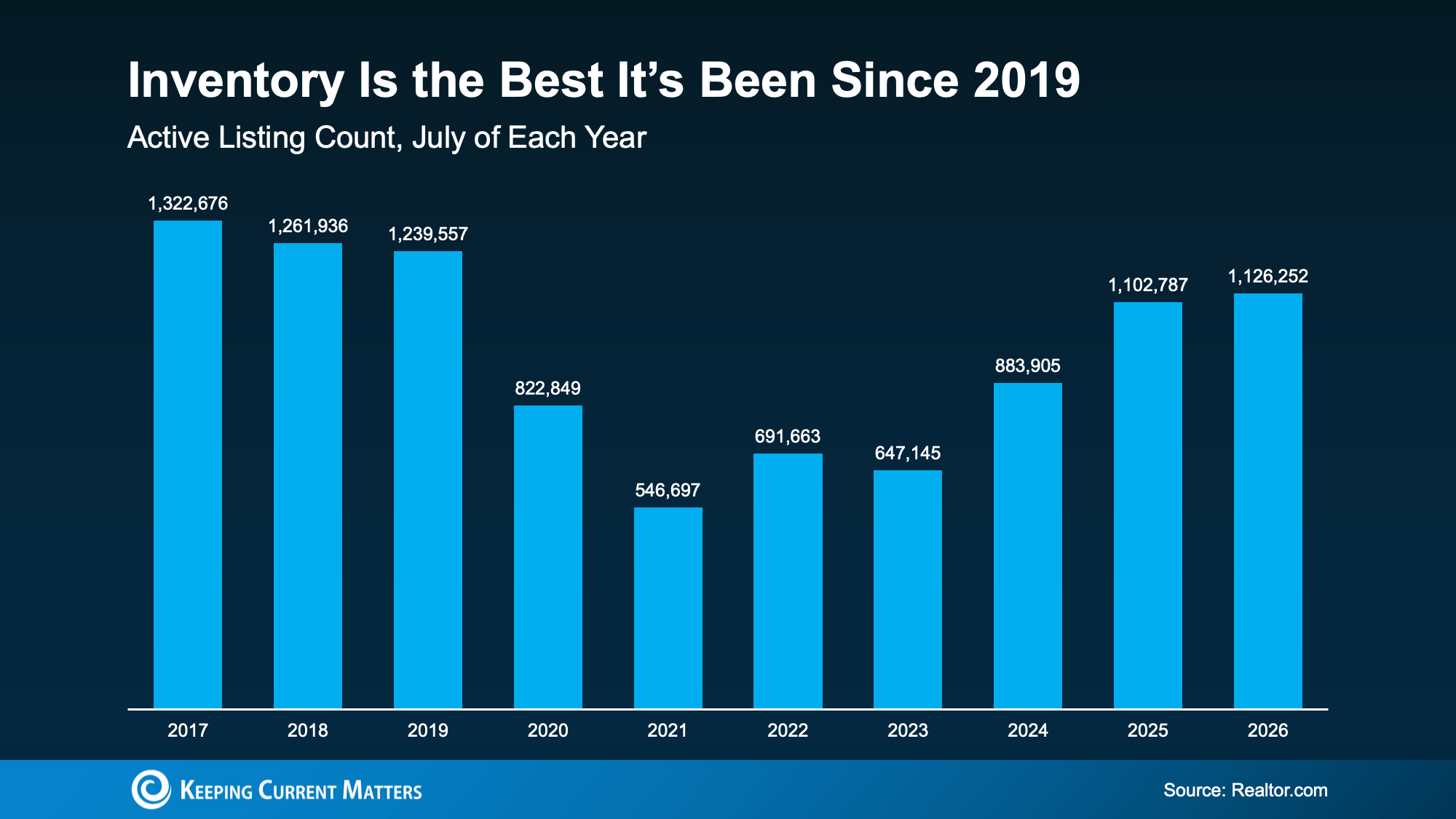
Compared to the rock-bottom lows of 2021, inventory has climbed back substantially. Nationally, the number of homes for sale has been up year-over-year consistently now for 33 months. And inventory has almost doubled in just a few years. So don’t get too hung up on the pace of that increase.
This July was actually the best July for inventory since 2019 (see graph below):
Now, the market still needs about 150k listings to get back to pre-pandemic levels, but things are quickly approaching normal. And experts think we may even be back to 2019 levels by the end of this year, even with the slowdown we’ve already seen.
And that’s thanks to one unlikely factor: mortgage rates.
Why Higher Rates May Actually Help Inventory Grow
It works like this. When mortgage rates climb, inventory tends to climb with them. As Mike Simonsen, Chief Economist at Compass, explains:
“When rates rise; inventory rises. When rates fall; inventory falls. So, from July last year to March this year, rates ease lower and all the inventory growth of the past several years evaporated. If rates move higher from here or stay elevated for [a] longer period of time, then we should expect supply to build again.”
Well, rates are expected to hold in the mid-to-upper 6% range for a while longer, and Realtor.com‘s latest forecast has inventory ending 2026 up 3.6% year-over-year.
That means 2 things:
Inventory growth is forecast to pick up a little bit throughout the rest of the year.
And, inventory is projected to close the year at a historically normal level, right about where it stood at the end of 2019.
For buyers, that’s a win. Even if today’s rates aren’t your favorite, they’re helping the number of homes on the market to grow. And more homes for sale means more choices, more room to negotiate, and less pressure to rush your search.
Bottom Line
The number of homes for sale is growing slowly but surely, and that means more options for your move. Want to see what’s available in your area? Reach out to a local real estate agent.
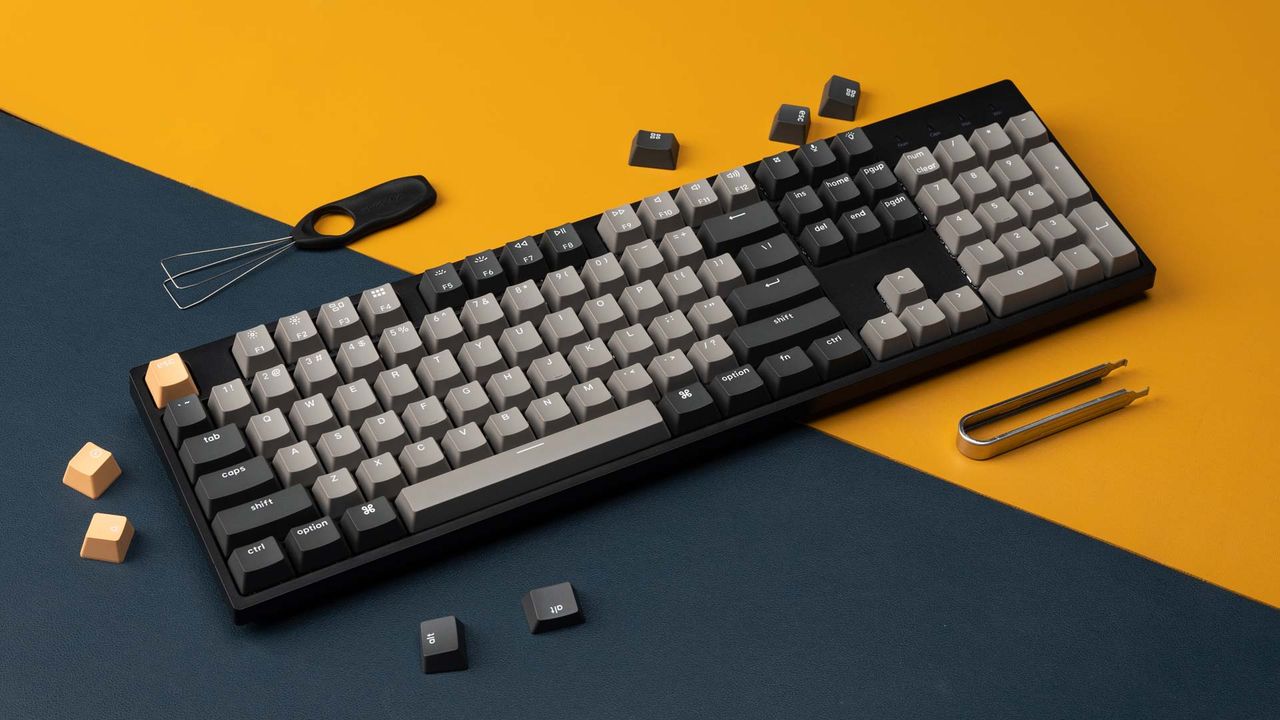
The C2 Pro wired keyboard uses a full-size (100%) layout. It includes premium features like QMK support for per-key programming, a 1,000 Hz polling rate, and south-facing RGB to reduce potential interference with Cherry-profile keycaps. It also supports Windows and Mac OS systems, and you can even configure different keymaps for Mac and Windows devices. It uses double-shot PBT caps with a curved OEM profile, while underneath you can choose between Keychron Super Brown (Tactile) or Super Red (Linear, quiet) switches, both pre-lubed for a better feel and sound profile.
The C2 is one of Keychron’s budget models, so you won’t find fancy displays or knobs. In that light, it uses a plastic frame to house all the internals, but I found it to be surprisingly rigid for a plastic full-size. My wife used this keyboard with the red switches, and I could barely hear the clickity-clack of keys from her home office down the hall from mine. The RGB lighting offers a soft glow from under the keys, and you can easily cycle through 22 pre-programmed light shows to match your mood (or just shut it off). It’s also ergonomic with three levels of adjustable typing angles.
While there are tons of inexpensive no-name keyboards out there, finding a name brand like Keychron for under $30 ($25 if you’re new to Woot!) means you don’t have to worry about buying something that’s hands-down worse than the C2 Pro. Woot deals don’t last long, so jump on this deal before it disappears.
The tech industry faces unprecedented challenges as the continued disruption from AI-driven shortages has driven pricing to record highs and supplies to record lows.
However, even amidst the damage we’ve seen in the PC market, the industry is still moving forward, giving us plenty of new devices over the last year that continue to push the bar higher.
The continued industry advancements give us several new picks for our annual Tom’s Hardware Innovation Awards: a set of products that set or expand the standard for others. This year’s list includes devices ranging from CPUs from Intel and AMD to motherboards with support for a new type of memory to the newest line of budget laptops from Apple, among many others. Given the state of the industry and stagnation in a few key areas, we also have a few dishonorable mentions as well.
Latest Videos FromTom’s Hardware
CPU: Intel Core Ultra 5 250K Plus
(Image credit: Tom’s Hardware)
Both of Intel’s Arrow Lake Refresh CPUs are excellent, but the 20-core Core Ultra 5 250K Plus hits a special sweet spot for value. At $220, or as little as $155 on sale, it delivers solid midrange gaming performance while competing with chips that are a tier up in pricing and branding in applications. Against the backdrop of re-releases like the Ryzen 7 5800X3D, it’s hard to choose anything other than Arrow Lake Refresh when we think about CPU innovation over the past 12 months.
The Core Ultra 5 250K Plus taking center stage comes down to how much horsepower you’re getting for around $200. There’s nothing else close. It matches that Core i5-14600K in multithreaded performance, but that CPU is $260 right now. In AMD’s camp, the closest CPU is the $185 Ryzen 5 9600X. The Core Ultra 5 250K Plus is 5.6% faster than that chip in single-threaded performance and 70% faster in multithreaded performance based on our testing.
The weak link with Arrow Lake has always been gaming, and the Core Ultra 5 250K Plus carries some of those issues forward. However, it benefits from Intel’s iBOT feature in select titles, as well as a 900 MHz die-to-die frequency boost that broadly benefits games. Gen-on-gen, the 250K Plus is in lockstep with the Core i5-14600K, and it matches the Ryzen 5 9600X. However, for pure gaming rigs, the Ryzen 5 7600X3D is around the same price and 10% faster (though much slower in other applications).
Get Tom’s Hardware’s best news and in-depth reviews, straight to your inbox.
HEDT: AMD Ryzen 9 9950X3D2
(Image credit: Tom’s Hardware)
AMD said it wouldn’t make a dual-cache X3D CPU, yet here we are, with the Ryzen 9 9950X3D2 in hand. It’s not a chip that we’d recommend to most builders, even with an unlimited budget; the base Ryzen 9 9950X3D is nearly identical in all but the most niche workloads and hundreds of dollars less. But from the perspective of innovation, the 9950X3D2 achieves something that we never thought we’d see.
As AMD originally promised when discussing dual-cache CPUs, the 9950X3D is expensive, launching at $1,000 and now selling for $890 — a price that still feels far too high. What’s surprising about the CPU is that it delivers no-compromise performance. It can hang alongside the 9800X3D in games; it’s just as fast as the 9950X3D in applications. The extra cache steps in with workstation-level tasks, accelerating data science and AI workloads, in particular.
For the vast majority of users, you won’t notice any performance difference between the 9950X3D2 and 9950X3D. However, the dual-cache chip offers that slight, flagship edge in specialized workloads. And in a time when the majority of high-end computing innovation is heading to the data center, it’s nice to see an ambitious release like the 9950X3D2 on desktop.
Intel’s Arc G3 Extreme handheld platform and its Arc B390 iGPU have changed the game for handheld performance thanks to the cutting-edge Xe3 graphics architecture and the unmatched performance of the B390’s 12 Xe Cores for this class of chip. It’s made the biggest splash in graphics so far this year as new discrete graphics cards from Nvidia, AMD, and Intel itself remain the stuff of rumors.
In our review of the MSI Claw 8 EX AI+, the Arc B390 iGPU thoroughly outclasses AMD’s widely used Ryzen Z2 Extreme and its 16 compute units built on the older RDNA 3.5 architecture. Intel’s iGPU turned in performance as much as 50% higher than the Z2 Extreme, even unplugged and at a relatively demanding 1920×1200 native resolution.
The Arc B390 also gives handheld fans access to Intel’s high-quality XeSS 3 upscaler with multi-frame generation, offering those gamers advanced tools to tune their gaming experience to taste. AMD hasn’t officially brought its latest FSR 4 tech to the Z2 Extreme yet, so Intel’s upscaler is the most advanced you can get on a handheld—at least in the games where it’s available.
The Arc B390 is the gaming star of the G3 Extreme, but its Panther Lake-based CPU with two P-cores, eight E-cores, and four low-power E-cores gives handhelds built with this chip plenty of CPU power for a balanced package.
The MSI Claw 8 EX AI+ is the first Arc G3-powered gaming handheld, but the OneXPlayer 3 (arriving this month) and Acer Predator Atlas 8 (shipping in October 2026) promise to expand the availability of this platform soon. Our only complaint about the Claw 8 EX AI+ is its high $1799 price tag, but if you want the best handheld gaming experience this side of a much more expensive Strix Halo-powered unit, that’s just the state of things amid the AI-driven RAMpocalypse and NANDpocalypse.
Pricing has been the biggest problem with new SSDs, with prices skyrocketing over the last year as the AI-driven shortages intensify. Despite those challenges, the Corsair MP700 Micro 4TB SSD brings new and innovative features to the table, cramming in the utmost performance into the tiny single-sided M.2 2242 design, making it the fastest and highest-capacity option in this compact footprint.
This PCIe 5.0 SSD leverages the DRAM-less Phison E31T SSD controller, delivering speeds up to 10,000 MB/s of sequential read and 8,500 MB/s of sequential write throughput. Sprinkle in the peak 1.3 million random read and 1.4 million random write IOPS, and this SSD is poised to fully saturate any PCIe 4.0 link, which is the predominate interface used in devices that use this small footprint. The SSD also has exceptionally good power efficiency, a boon for small handheld devices that operate on battery power.
Smaller, faster, more capacity, and better power efficiency; what’s not to like? The only con for this SSD is the same as we see for all models currently — pricing. Hopefully the shortages will recede and bring the pricing of this drive to more tenable levels, but on the whole, this is the most innovative SSD released this year.
We’ve been seeing a lot of activity in the OLED gaming monitor space over the past year, and panel makers are investing heavily in new technology to make already color panels look even better. The swift advancements have also led to lower prices across the board for OLED monitors, which is an absolute blessing considering that gamers are being pummeled from multiple fronts, with rising costs for RAM, SSDs, and even GPUs.
One new monitor making waves is the Alienware AW3426DW, one of the brand’s first offerings to use a Penta Tandem OLED panel (it features five light-emitting layers instead of three) with V-Stripe RGB sub-pixels. This panel has several advantages over previous QD-OLED panels, with the Penta Tandem arrangement improving energy efficiency and panel longevity. Likewise, the V-Stripe RGB sub-pixels help to combat color fringing and somewhat blurry text, which can be an issue with older QD-OLED designs.
Once you get past the building blocks that make the AW3426DW a standout, it checks all the right boxes for the discerning gamer. It features a 34-inch panel size with an 1800R curve and a 3,440 x 1,440 resolution. Just as important is the refresh rate, which maxes out at 280 Hz while supporting Nvidia G-Sync and AMD FreeSync Premium Pro. Full-field brightness comes in at 300 nits, while it can boost to 1,300 nits (HDR) with a 3 percent window (it’s also DisplayHDR 500 True Black certified).
When it comes to ports, the AW3426DW features two HDMI 2.1 ports and one DisplayPort 1.4 port. It also has a USB-C hub with USB-A and USB-C ports for your peripherals.
As for actual performance, the AW3426DW didn’t disappoint, with sharp, colorful imagery that we expect from OLEDs (especially compared to the previous-generation AW3425DW). We also witnessed low input lag levels compared to its peers. More importantly, the AW3426DW represents an excellent value in this space, with a street price of just under $800.
Motherboards: Gigabyte Z890 Aorus Elite Duo X (CQDIMM compatibility)
(Image credit: Tom’s Hardware)
Innovation on the motherboard side has been few and far between. CQDIMMs hit the scene promising increased density, 128GB per stick, and much faster speeds. In fact, we tested a 2x128GB DDR5-8000 set on one of the few affordable consumer motherboards that actually support the high-density, high-speed CQDIMMs: the Gigabyte Z890 Aorus Elite Duo X (MSRP of $279.99), which gets our nod for an innovative motherboard.
The Z890 Elite Duo X sports a 2-DIMM topology and is an early adopter of next-gen JEDEC standards. Gigabyte enhanced the 2-DIMM topology with improved signal reflection by removing the middle slots and thus the interference. They also optimized the PCB circuit with advanced EMI shielding and “2x signal enhancement.” They also tuned the BIOS to support the high-capacity sticks better, upgraded the MRC training algorithm to enhance stability, and even offered per-rank independent tuning for termination, drive strength, and voltage.
I considered the CAMM2 design standard and any boards that support it, as it is unique and innovative. However, it’s still a twinkle in the industry’s eye, and only prototype and concept boards seem to exist in the wild. We loved Gigabyte’s space-age X870E Aorus Infinity Next concept, but here again, we won’t see the technology in the public.
(Image credit: Tom’s Hardware)
If you’re someone who can use such high-capacity sticks (like running local AI tools, 4K/8K video editing, and content creation), and need the blazing speeds on top of it, the Z890 Elite Duo X stands alone as one of the more reasonably priced ATX form factor motherboards that can actually run them. Other boards do support CQDIMMs (ASRock’s Z890I Nova Wifi R2.0, Z890 Aorus Tachyone Duo X Ice) but good luck finding them in the USA at a reasonable price.
In addition to the CQDIMM support, the board also offers a well-rounded assortment of features for any user. You get a whopping five M.2 sockets (one PCIe 5.0), fast networking with 2.5 GbE and Wi-Fi 7 (320MHz), three full-length PCIe slots, capable power delivery, a last-gen flagship audio codec, and a slew of their DIY-friendly features like M.2 EZ-Latch designs (click, plus, and PCIe EZ-Latch plus, Wi-Fi EZ plug). Even without the CQDIMM capability, it’s a good motherboard.
The MacBook Neo stunned the world. Everyone was expecting a notebook cheaper than the MacBook Air, but no one seemed to expect that you’d be able to get a basic Apple laptop experience for just $599. (That price increased to $699 after component-related hikes across Apple’s Mac and iPad lines).
The system uses Apple’s A18 Pro system on a chip, which also powered the iPhone 16 Pro. That includes six CPU cores, five GPU cores (down one from the iPhone), and 8GB of RAM. It also has a solid aluminum build that feels great, a decent, consistent, bright screen (that looks best head-on), side-firing speakers, and a keyboard not unlike the one on a MacBook Air. Even though there’s a mechanical touchpad, Apple designed a mechanism that lets you click anywhere, rather than using a hinge.
Beyond the headphone jack, there are only two ports, and they’re not the same speed. The A18 Pro wasn’t meant for two ports, but Apple had to make it work. This resulted in an awkward combination of one 10GB/s USB-C 3 port and a second, 480 Mb/s USB-C 2 port, leading to two visually identical ports that don’t offer the same experience. Despite a few drawbacks, the MacBook Neo is largely an extremely solid experience and far more affordable than we’ve seen before. It has also inspired competition among its Windows-based rivals, with the Dell XPS 13, Acer Swift Air 14, and other Intel Wildcat Lake systems bringing some nicer laptops in under $1,000 in response.
The Dell XPS 14 is perhaps most notable for breathing some fresh air back into the brand. Beyond being one of the first systems since Dell revived its flagship PC label, the XPS 14 also fixed many of the problems its predecessors had. The touch function keys are gone, replaced with an honest-to-goodness function row. The haptic touchpad still sits in a glass wristrest but with defined barriers that ensure anyone can tell where the edges are. But most interesting is the option for a 1920 x 1200 variable refresh rate display that drops as low as 1 Hz (and up to 120 Hz). That extremely low refresh rate means the system won’t refresh as often when static text or images are on the screen. Our review unit with that screen lasted over 20 hours on our battery test.
Leave it to Noctua to take its sweet time entering a well-established cooling category, and drop a product that performs as well as any competition (in terms of temps), while being hands-down the quietest AIO on the market. And of course, the NL-LC1-36 does this with no RGB, and in the company’s signature brown and beige. Built in partnership with Asetek, around the company’s Emma Gen8 V2 pump, with a noise-absorbing pump cover, the cooler is paired with two or three NF-A12x25 G2s fans (depending on the model).
The fans even have 50 RPM offsets to avoid audible harmonics – our testing showed it beating the high-end cooling competition in noise-normalized benchmarks, while its pump can run much slower in low-load situations than anything else, further limiting acoustics. To be clear, at $220-$250, you’ll pay for this level of silent, refined cooling, but Noctua has raised the bar, delivering a level of liquid cooling previously only available via custom cooling, which is much more complex and expensive.
The Corsair Galleon 100 SD is the first keyboard with a built-in physical Stream Deck. While this might not have seemed particularly revolutionary at first (after all, there are plenty of keyboards with… extra programmable keys), it’s far more useful than you might expect, thanks to Elgato’s robust Stream Deck ecosystem, which is pretty well-integrated with third-party hardware and apps. Plus, the keyboard itself is excellent — it features an aluminum top case over a plastic chassis, a hot-swappable PCB, lower-profile double-shot PBT keycaps, and six layers of sound-dampening foam that does a great job of keeping case ping and echoing to a minimum. It also gets up to an 8,000 Hz polling rate and comes with a matching wrist rest.
The Stream Deck side is also impressive, with 12 customizable LCD keys under a 2.75-inch full-color screen and two programmable aluminum rotary knobs. You’ll still have to set it up, as a Stream Deck (or any macro pad) is only as useful as you make it, but Elgato’s Stream Deck software makes this relatively easy, and you can find plenty of additional plugins and customization options on the Stream Deck Marketplace (plus, it does come with some pre-programmed options to get you started). It’s not the cheapest keyboard on the market — it retails for around $350 — but if you’re willing to set up the Stream Deck side, it’s well worth the price.
It’s not the first mouse to have a built-in fan, but it’s the first mouse worth buying with a built-in fan. The Pulsar Feinmann F01 Noctua Edition is a lightweight wireless eSports-oriented gaming mouse with a perforated shell and a built-in Noctua NF-A4x10 5V fan, which is aimed upward — designed to keep your palm cool while you game. The NF-A4x10 is surprisingly effective, with four adjustable speed levels, and it’s mostly silent (you can hear it at the highest level, but it shouldn’t be too much of an interruption).
It’s also a great mouse, featuring Pulsar’s XS-2 sensor, which has a maximum resolution of 42,000 DPI and a maximum speed of 800 IPS and can handle up to 70 G’s of force. It gets up to an 8,000 Hz polling rate over both wired and wireless connections, and it has a comfortable, ergonomic right-handed shape with five programmable buttons. It weighs 73g — a little heavier than most of its competition, but the fan might just be worth it.
We hadn’t seen a ton of innovation on the performance side of gaming mice — until earlier this year, when Logitech dropped its Logitech G Pro X2 Superstrike earlier this year. The specs are premium, but expected: Logitech’s Hero 2 sensor, which has a maximum resolution of 44,000 DPI and a maximum speed of 888 IPS and can handle up to 88 G’s of acceleration; up to an 8,000 Hz polling rate; and a 61g, pseudo-symmetrical shape that’s identical to that of the Logitech G Pro X Superlight 2.
What’s innovative are the switches — or rather, lack thereof. Instead of using actual switches below the left and right mouse buttons, the Superstrike uses Logitech’s H.I.T.S. (Haptic Inductive Trigger System), which combines induction sensors with haptic feedback. The result is mouse buttons with adjustable actuation and tactile feedback. In other words, you can lower the actuation of your mouse buttons to make them incredibly sensitive and — objectively — more responsive, without sacrificing tactility. It also means that this is the first (and, still, only) mouse that supports Rapid Trigger, which means you don’t have to fully release the mouse button before you can click it again — making it even more responsive.
There’s no guarantee this mouse will make you a better gamer, but it certainly won’t hold you back.
Intel’s entry-level chips might not always seem exciting, but this year, they’re powering a handful of the most important Windows systems on the market: the ones competing with the MacBook Neo. There are six consumer configurations of Wildcat Lake, all built on Intel’s 18A process. The silicon uses a two-tile package with a compute die and an external platform controller tile. The compute die carries up to two Cougar Cove P-cores, four Darkmont low-power E-cores, an NPU 5 block, and an Xe3 integrated GPU with up to two Xe-cores, while the platform controller tile delivers six PCIe 4.0 lanes, up to two Thunderbolt 4 ports, Intel Wi-Fi 7 (R2), and Bluetooth Core 6.0.
We’ve seen versions of Wildcat Lake in a number of consumer notebooks, but among the most important are the Dell XPS 13, the highest-profile Neo competitor, as well as sub-$800 models from Acer, Lenovo, and Chuwi. Outside of Snapdragon X chips from a few years ago, these are the systems keeping x86 and Windows competitive on the low-end.
When DDR5 was first introduced to consumer platforms, there was a fuss about how expensive it was compared to DDR4, a comparison that now seems quaint given the current market conditions. With how expensive DDR5 has become, there’s been a shift back to DDR4 platforms, with Tom’s Hardware first reporting in June about motherboard manufacturers spinning refresh DDR4 boards up to meet the demand; Gigabyte actually launched a new LGA 1700 DDR4 board just days ago.
The CPU brands are bracing for a tick back, as well. AMD has already re-released the Ryzen 7 5800X3D, and ironically at a price higher than the DDR5-based Ryzen 7 7700X3D, which is newer, faster, and surprisingly cheaper, at least for the CPU alone. For Intel’s part, murmurs about “Raptor Lake Next” have floated around, with Tom’s Hardware first reporting on the range earlier this year.
It became clear even in the first few weeks of the memory shortage that DDR4 platforms would remain popular. However, what we’ve seen over the past few months is something different, with DDR4 becoming an upgrade destination due to the prohibitive cost of DDR5. The memory shortage is perhaps the biggest story of the past 12 months, and unfortunately, it doesn’t appear like it’s ending soon.
The sad truth for PC gamers in 2026 is that we’re no longer anywhere close to the first priority for GPU innovation. Nvidia and AMD are laser-focused on the AI compute arms race, and any resources or wafers that aren’t dedicated to that market represent a large opportunity cost for those companies as they try to capture every last AI dollar.
Nvidia’s long-rumored RTX 50 Super-series refresh, if it ever arrives, would likely follow a familiar approach of slightly boosting core clocks and increasing the amount of VRAM on select cards using 3GB GDDR7 chips.
Reports indicate those denser GDDR7 chips are quite costly, though, and any increase in VRAM capacity on gaming graphics cards would immediately make them better for local AI applications while offering little performance benefit to the vast majority of games available today.
Since local AI trailblazers are ravenous for every FLOP and gigabyte of VRAM they can get and are willing to pay premium prices for the privilege, any RTX 50 Super products would likely launch at even higher price points than the already hiked-up RTX 50-series products already in the market.
And since Nvidia’s RTX Pro cards already offer larger VRAM pools paired with the same Blackwell silicon, any RTX 50-series Super products also run the risk of cannibalizing sales of products at the low end of the RTX Pro stack. All these pricing and positioning headaches make us skeptical that we’ll ever see a Super-series refresh under current market conditions.
Any further gaming innovation this year from Nvidia seems likely to be concentrated on software. The company has spent much of 2026 improving its already superior DLSS upscaling and frame generation technologies. Its wildly controversial DLSS 5 update, which promises an extensive AI-powered enhancement of lighting effects and character details in supported titles, is slated to launch this fall, but it remains to be seen whether the considerable resource demands of the tech will be tamed before that point. And it’s just as unclear whether gamers will ever warm up to the extensive changes that DLSS 5 makes to the final presentation of a game.
AMD’s next-generation RDNA 5 gaming products also seem unlikely to arrive any time soon. The current buzz projects that those products will arrive late next year or in early 2028, and given that AMD’s client and data center CPU and AI GPU revenue are both set to massively outpace the contributions of its gaming business unit, it seems that the company will likely continue to focus resources on those areas until there’s competitive reason to do otherwise.
Intel also hasn’t committed to any new discrete gaming graphics products with its current roadmap, and the relatively lackluster gaming performance of its Arc Pro B70 “Big Battlemage” card (roughly equivalent to an RTX 5060 Ti) suggests that the Xe2 architecture has reached the end of the line for performance scaling from a larger (and costlier) chip.
Intel instead seems focused on driving iGPU performance forward (as proven by the impressive Arc B390) and on capturing a bit of the AI market with its Crescent Island inference accelerator using the Xe3P architecture. The ongoing AI gold rush, combined with CEO Lip-Bu Tan’s professed focus on improving Intel’s operating margins, likely means that any future discrete GPU from the company will face considerable challenges for an internal green light under current market conditions.
Business is business, and public companies have an obligation to maximize shareholder value. That means that unless and until the semiconductor industry finds a new level with the AI boom such that the insatiable demand for AI silicon and memory is met, PC gamers are going to have to face the disappointing fact that we’re in the back seat for any future gaming chips. But can we offer you an RTX 3060 12GB in this trying time?
Bad bots account for 91% of the traffic reaching one retailer’s DDR5 memory product pages, roughly 10 automated requests for every legitimate visit, according to a LinkedIn post this week from Jérôme Segura, VP of threat research at bot-mitigation firm DataDome. The figure updates research DataDome published in March, which measured the ratio at about 6:1 across several e-commerce sites.
Over the same period, the cheapest 128GB DDR5-6400 kit tracked by Tom’s Hardware has reached $3,399, ten times its record low pricing. The Thales 2026 Bad Bot Report puts bad bots at 40% of all web traffic, less than half the share Segura reports on DDR5 listings.
DataDome’s March report documented a single operation that generated more than 10 million blocked requests, with a one-hour sample showing 91 DDR5 listings each polled around 551 times, or once every 6.5 seconds. The requests carried cache-busting parameters to defeat cached stock data and targeted industrial module makers such as Micron and Apacer, as well as DIMM socket suppliers Amphenol and TE Connectivity, alongside consumer brands.
Latest Videos FromTom’s Hardware
Segura wrote on LinkedIn that retailers carrying memory should assume their “traffic analytics are probably understating the problem significantly.”
(Image credit: DataDome)
Keep in mind that the 91% figure comes from one unnamed retailer, and DataDome hasn’t published a sample window or its methodology. DataDome also sells the product that blocks this traffic, and page requests ultimately aren’t purchases, so the ratio measures monitoring pressure on listings rather than how much stock bots actually end up securing, which can’t easily be quantified.
Apacer CEO C.K. Chang said in July that DRAM supply to independent module makers could fall to 30% of 2026 levels next year, and TrendForce expects conventional DRAM contract prices to rise another 13% to 18% in Q3 after roughly 60% in Q2. Hyperscale buyers have reportedly placed deposits against most of 2027’s DRAM output.
A 32GB DDR5-6000 kit that averaged $72 this time last year now averages $392 on PCPartPicker. While graphics card and console scalping in 2020 and 2021 ran against scheduled restocks that eventually outpaced resale demand, no equivalent restock date exists for consumer DDR5 before 2027 at the earliest.
Get Tom’s Hardware’s best news and in-depth reviews, straight to your inbox.
Framework stopped selling standalone RAM in November last year, citing scalpers, and Micro Center sells its CPU, motherboard, and 32GB DDR5 bundles in-store only with a one-per-household limit. Newegg and Amazon have run repeated CPU-plus-memory bundles that price a 32GB kit well below its standalone cost, which ties each kit to a processor a reseller then has to move as well. On eBay, we found G.Skill’s Trident Z5 Neo 32GB kit listed at $836.54 in December against a $429.99 retail price, roughly double, and about seven times the $117.99 it sold for before the shortage.
Our expert reviewers spend hours testing and comparing products and services so you can choose the best for you. Find out more about how we test.
Cooler Master occupies an unusual position in the power supply market. Founded in Taiwan in 1992 and best known for the cases and coolers that made its name, the company has spent more than two decades selling PSUs without ever being a PSU manufacturer in the strict sense. Like most brands in this space, it commissions platforms from a rotating cast of OEMs, and the quality of a given Cooler Master unit has historically tracked the quality of whoever built it. The V series sits at the top of that catalog, and it is the line where Cooler Master has consistently spent money on the platform rather than on the sticker.
The V Platinum 3000 Workstation is something else again. Announced at the end of July 2026, it is Cooler Master’s entry into the multi-kilowatt category that SilverStone opened with the Hela 3000RZ, and Thermaltake followed with the AX-3200, aimed squarely at multi-GPU AI development boxes and rendering workstations rather than at anything that could reasonably be called a home and/or gaming PC. The headline numbers are a single 12V rail rated at 250A, four native 12V-2×6 connectors, twelve PCIe 6+2 connectors, twelve SATA and four Molex, all fed from a 202 mm chassis with a twelve-year warranty behind it. The catch is on the input side: this unit accepts 220-240 VAC only, drawing up to 16A through an IEC C20 inlet, and it shuts down when the AC line drops below roughly 170 VAC. There is no 115 VAC operating mode, which is why every measurement in this review was taken at 230 VAC. We await the pricing announcement to ascertain where the V Platinum 3000 Workstation ranks among our list of best power supplies today.
Specifications and Design
Swipe to scroll horizontally
Cooler Master V Platinum 3000 Workstation — Power specifications ( Rated @ 45 °C )
RAIL
+3.3V
+5V
+12V
+5Vsb
-12V
MAX OUTPUT
22A
22A
250A
3A
0.3A
Row 2 – Cell 0
120W
120W
3000W
15W
3.6W
TOTAL
3000W
Row 3 – Cell 2
Row 3 – Cell 3
Row 3 – Cell 4
Row 3 – Cell 5
AC INPUT
220 – 240 VAC, 50 – 60 Hz, 16A
Row 4 – Cell 2
Row 4 – Cell 3
Row 4 – Cell 4
Row 4 – Cell 5
MSRP
TBA
Row 5 – Cell 2
Row 5 – Cell 3
Row 5 – Cell 4
Row 5 – Cell 5
In the Box
The V Platinum 3000 Workstation ships in a plain kraft carton wrapped in a deep blue sleeve, with a render of the unit on the front and the badges laid out along the bottom edge: 80 PLUS Platinum (230V EU), the twelve-year warranty shield, a Japanese capacitor callout, and the ATX 3.1 with 12V-2×6 and PCIe 5.1 Ready logos. It is a restrained, business-like presentation, and appropriately so. Nobody buying a 3000W workstation supply rates shelf appeal as top priority. We should note that the 80 PLUS certification is not published on CLEAResult’s public database at the time of this review.
Latest Videos FromTom’s Hardware
(Image credit: Tom’s Hardware)
Inside, the supply sits between molded protective packaging. The accessory bundle is spartan: a multilingual user guide with the pin-layout diagrams, Cooler Master’s recommended PCIe cable installation leaflet, and four mounting screws. There are no cable combs, no zip ties, no Velcro straps, and no storage pouch. For a unit that ships with more than thirty individual connectors, the absence of any cable management hardware is a genuine omission rather than a cost saving, and it is one of the few places where the presentation feels thinner than the product. Most importantly, however, there is no AC power cable, and this unit requires a C19 connector, which is not very common.
(Image credit: Tom’s Hardware)
The modular cables are very flexible, all-black and per-wire mesh-sleeved rather than the flat ribbon types Cooler Master uses further down the range, which suits the intended market. These will be routed once, most likely in a large chassis, and left alone. The four 12V-2×6 cables use the two-color connector treatment the ATX 3.1 specification encourages, with purple latch inserts that make an incompletely seated plug immediately obvious visually.
(Image credit: Tom’s Hardware)
Swipe to scroll horizontally
Cooler Master V Platinum 3000 Workstation
Connector type
Hardwired
Modular
ATX 24 Pin
–
1
EPS 4+4 Pin
–
1
EPS 8 Pin
–
1
12V-2×6 (PCI-E 5.1)
–
4
PCI-E 6+2 Pin
–
12
SATA
–
12
Molex
–
4
Floppy
–
–
External Appearance
At 202 x 150 x 86 mm the V Platinum 3000 Workstation is a genuinely large power supply. That 202 mm of depth rules out a great many mid-tower cases outright and will make cable routing awkward in several more, so this is a unit that needs to be designed into a build rather than dropped into an existing one.
(Image credit: Tom’s Hardware)
The finish is a fine-grain matte black texture, and the top face carries the same rhombille tiling fan grille pattern Cooler Master has used across the V and MWE lines, framed by four exposed screws. Decoration is limited to a thin white pinstripe running the length of the top edge, “V PLATINUM” silkscreened along one shoulder, and a recessed side plate carrying the V logo, “PLATINUM 3000” and the Cooler Master wordmark in white. An embossed Cooler Master logo sits on the underside. This unit looks more like industrial equipment than a gaming PSU, which is appropriate for a workstation PSU.
Get Tom’s Hardware’s best news and in-depth reviews, straight to your inbox.
Image 1 of 2
(Image credit: Tom’s Hardware)
(Image credit: Tom’s Hardware)
The rear face is dominated by hexagonal perforation, with a 16A IEC C20 inlet – not the C14 fitting found on consumer supplies – and a typical rocker switch. The front face is entirely given over to the modular bay, silkscreened into labelled groups: two CPU/PCI-E blocks flanking a central 12V-2×6 group of four sockets, a SATA/PATA group, and the motherboard block. The specifications label lives on the top side.
Image 1 of 2
(Image credit: Tom’s Hardware)
(Image credit: Tom’s Hardware)
Internal Design
Cooling is handled by a 140 mm ZI.C ZFB142512E, a three-wire model rated for 0.95A at 12V. Cooler Master specifies a fluid dynamic bearing, and the ZFB prefix is consistent with that, but ZI.C has no public specification sheet for the part. Given the twelve-year warranty and the temperatures this platform reaches under load, the fan is the component we would most like to know more about. There is no semi-passive operation: the fan turns on from the moment the unit is switched on.
(Image credit: Tom’s Hardware)
The platform is a Channel Well Technology design, and the layout is the vertically stacked, multi-daughterboard arrangement CWT reaches for when a conventional flat topology runs out of board area. Transient filtering is very basic and begins behind the AC receptacle and continues on the main board, with two X capacitors, two Y capacitors, a MOV, and two large sleeved common-mode chokes. Inrush current is handled by an NTC thermistor bypassed by a Hongfa HF32F-E relay.
Image 1 of 2
(Image credit: Tom’s Hardware)
(Image credit: Tom’s Hardware)
Rectification is done by three input bridges sandwiched together on a small dedicated heatsink, which is the first clear sign of the current this platform is built to pass. The APFC stage uses Infineon 60R060P7 MOSFETs, and its passive side is the visual centerpiece of the unit: three Nippon Chemi-Con 420V/820uF 105°C bulk capacitors, 2460uF in total, alongside two encased filtering coils, taking up nearly 25% of all the space in the unit all by themselves.
(Image credit: Tom’s Hardware)
The primary inversion stage sits on its own vertical PCB and its switching devices are not visible without further disassembly, but is controlled by a Skyworks Si823380. It feeds two main transformers, PQ35/37 cores marked G09-PQ3500S-P1AR and rated Class 130(B), mounted side by side and generously taped and glued. Two transformers rather than one is the pragmatic answer to a 250A output: it splits the current, halves the copper losses in each winding, and spreads the heat across two thermal masses instead of concentrating it in one. It also, unavoidably, doubles the component count in the most expensive part of the supply.
(Image credit: Tom’s Hardware)
The secondary side is built from eighteen Infineon 07N04LS6 MOSFETs performing synchronous rectification on a second vertical PCB, standing directly behind the transformers. A third vertical board carries the DC-to-DC converters that derive the 3.3V and 5V rails, with two toroidal output chokes and a bank of polymer capacitors. Secondary filtering is a mix of Nippon Chemi-Con and Rubycon parts, which makes Cooler Master’s all-Japanese capacitor claim accurate rather than aspirational (which is not often the case). The modular connector board is fed by solid copper bus bars rather than wiring, and the whole assembly is conformal coated, consistent with the moisture, dust, and corrosion resistance Cooler Master claims for the unit.
(Image credit: Tom’s Hardware)
Cold Test Results (25°C Ambient)
Cold Test Results (25°C Ambient)
For the testing of PSUs, we are using high precision electronic loads with a maximum power draw of 2700 Watts, a Rigol DS5042M 40 MHz oscilloscope, an Extech 380803 power analyzer, two high precision UNI-T UT-325 digital thermometers, an Extech HD600 SPL meter, a self-designed hotbox and various other bits and parts.
Due to the output capacity of this unit, our standard electronic load equipment required supplementation with additional high-capacity resistive loads to draw more than 2400 watts from the 12V rail alone. At 25°C ambient and 230 VAC, the V Platinum 3000 Workstation averaged 92.6% across the nominal load range. The curve peaks at 94.3% around 40% load and holds 94.1% at 50%, falling away to 91.0% at 2700W and 90.2% at a sustained 3000W. Against the 80 PLUS Platinum 230V EU thresholds, the unit clears all three, even if only barely. Dissipation tells the same story in absolute terms: 88.5W of loss at 1500W, rising to 294W at full output, which is more waste than the load of most complete home systems.
Acoustically, the cold run is the unit’s weakest showing. There is no fanless window at all, and while the first third of the curve is essentially flat, the ramp beyond that is steep. The meter reads 40.4 dB(A) at 1500W, 49.0 dB(A) at 2100W and 53.9 dB(A) at 3000W. In practical terms, this supply is quiet up to about 1200W and clearly audible past 2000W, which for its intended workload is the wrong half of the curve to be loud in. We should keep in mind, however, that this is not a product intended to be used inside bedrooms. The thermal performance of the unit is unremarkably efficient.
Hot Test Results (~45°C Ambient)
Hot Test Results (~45°C Ambient)
Inside the hotbox at 45-47°C ambient, efficiency gives up between one and one and a half points across the range, averaging 91.5%. The unit returned 92.6% at 20% load, 92.9% at 50% and 89.0% at a sustained 3000W, with peak efficiency of 93.2% arriving earlier in the curve at 30% load. Full-load losses climb to 329W. That degradation is proportionate and entirely ordinary for the temperature delta, and the shape of the curve is unchanged. This is a platform that scales predictably with ambient rather than one that falls off a cliff.
The thermal and acoustic picture is a different matter. The fan holds between 33 and 34 dB(A) up to 900W, then climbs hard: 45.4 dB(A) at 1500W, 54.5 dB(A) at 2400W and 55.6 dB(A) at full output, which is loud by any measure and would be intrusive in a work environment. The primary heatsink reached 125.4°C and the secondary 131.6°C at 3000W, with exhaust air at 81.6°C against a 47.0°C intake, and both heatsinks were already past 100°C at 2400W. While the platform held composure throughout and every rail stayed in specification, these figures leave very little thermal margin.
PSU Quality and Bottom Line
Power Supply Quality
Voltage regulation is excellent considering the massive power output and comfortably the best result in this review. Across the 20% to 100% load span the 3.3V rail moved by 0.8%, the 5V rail by 0.9% and the 12V rail by 1.7%. The 12V figure looks the loosest of the three but needs context: it covers a swing roughly from 48A to 243A, and the rail still only travelled from 12.21V to 12.01V, landing within 0.1% of nominal at full load.
Ripple suppression is equally strong. The 12V rail peaked at 66 mV under full load and 58 mV in the 12V-focused cross-load test, against the 120 mV ATX design limit – roughly 45% headroom on the rail that matters, from a platform delivering a quarter of a kiloamp. The 3.3V and 5V rails topped out at 26 mV and 30 mV respectively against their 50 mV limits, with the cross-load results at 28 mV and 30 mV. Ripple actually improves from 20% to 50% load before rising, which is the signature of a well-tuned resonant stage rather than one merely filtered into compliance. Although these figures can be easily beaten by a typical top-tier gaming PSU, it is remarkable that a workstation unit with more than twice the power output can deliver these.
During our thorough assessment, we evaluate the essential protection features of every power supply unit we review, including Over Current Protection (OCP), Over Voltage Protection (OVP), Over Power Protection (OPP), and Short Circuit Protection (SCP).
All protection mechanisms were verified and triggered correctly during testing. With the unit hot, OCP tripped at 140% on the 3.3V rail and 138% on the 5V rail, both generous thresholds that leave real headroom on rails nothing in a workstation will stress. The 12V rail tripped at 110%, or 275A, with OPP shutting the unit down at 112% of rated output – about 3360W. Those last two are tighter than we usually see, but at this scale that is the correct engineering decision: 10% of 250A is 25A, and the absolute headroom in amperes and watts is large.
Swipe to scroll horizontally
Main Output
Load (Watts)
610.64 W
Row 0 – Cell 2
1525.32 W
Row 0 – Cell 4
2267.74 W
Row 0 – Cell 6
3004.01 W
Row 0 – Cell 8
Load (Percent)
20.35%
Row 1 – Cell 2
50.84%
Row 1 – Cell 4
75.59%
Row 1 – Cell 6
100.13%
Row 1 – Cell 8
Row 2 – Cell 0
Amperes
Volts
Amperes
Volts
Amperes
Volts
Amperes
Volts
3.3 V
2.14
3.43
5.34
3.42
8.01
3.41
10.68
3.40
5 V
2.14
5.08
5.34
5.07
8.01
5.06
10.68
5.02
12 V
48.52
12.21
121.31
12.20
181.96
12.09
242.62
12.01
Swipe to scroll horizontally
Line
Regulation
Voltage Ripple (mV)
Row 1 – Cell 0
(20% to 100% load)
20% Load
50% Load
75% Load
100% Load
CL1 12V
CL2 3.3V + 5V
3.3V
0.8%
18
14
20
26
16
28
5V
0.9%
20
14
22
30
14
30
12V
1.7%
32
24
42
66
58
30
Bottom Line
The V Platinum 3000 Workstation is a serious piece of engineering aimed at a market that barely existed two years ago. The CWT platform is built for the job rather than scaled up from a consumer design: three input bridge rectifiers, three Chemi-Con bulk capacitors, two main transformers, eighteen synchronous rectification MOSFETs, solid copper bus bars to the modular board, and three vertical daughterboards to fit it all into 202 mm. The capacitor complement is genuinely all-Japanese, split between Nippon Chemi-Con and Rubycon, and the whole assembly is conformal coated. Cooler Master has not cut the corners it could have cut here.
(Image credit: Tom’s Hardware)
The electrical results back that up. Regulation is excellent on every rail, with the 12V line moving 1.7% across a 194A load swing and finishing within a tenth of a percent of nominal. Ripple is low and well behaved, with 45% headroom against the ATX limit on 12V at full load and no ugly cross-load behavior. Efficiency is tested to be Platinum at 230 VAC, averaging 92.6% cold and 91.5% hot, and the protections all trigger where they should – generously on the minor rails, sensibly on 12V and OPP. Nothing in the measurement set gives cause for concern about whether this supply will do its job. The only bug here is that there are no publicly available certifications for this unit yet – there is nothing on either CLEAResult’s or Cybenetics’ websites.
(Image credit: Tom’s Hardware)
The reservations are about how it does that job. It is not a quiet unit, and its internal temperatures can get pretty high if it (somehow) gets stressed. The platform held together, and every rail stayed in specification, but a workstation that could actually pull 3000W for a prolonged period of time would be asking a great deal of those capacitors, and the twelve-year warranty is doing a lot of work in that scenario. The 202 mm depth and the absence of any cable management accessories are lesser complaints, but the 220-240 VAC-only input is not a complaint at all – it is a hard constraint. This unit will not power on using standard consumer outlets in North America, Japan, or anywhere else on a 100-120V supply. Such consumers would need a two-phase 240V outlet to use this unit, which is commonly available in the US but not everywhere in the world.
(Image credit: Tom’s Hardware)
Βecause Cooler Master has not announced pricing, the value case cannot be closed. What can be said is where the unit sits technically. Against the competition, Cooler Master leads on warranty at twelve years, matches or beats several of the competitive units on connector count with four native 12V-2×6 and twelve PCIe 6+2, and is fairly competitive on efficiency. Against the Super Flower Leadex Titanium 2800W, it gives up regulation and ripple on every rail and sits a certification tier lower, but offers 200W more output and a considerably deeper connector loadout. Whether it can compete with Super Flower’s offering or not is mostly a matter of pricing at this point. For a 230V multi-GPU workstation that needs this much power from one supply, it is a well-built and well-measured option – price will decide the rest.
When’s the last time someone told you what your house is worth? Not what some online valuation tool guessed. Not what your neighbor’s house sold for. What yours is actually worth right now.
For a lot of homeowners, it’s been years. And if you’ve been thinking about moving, but higher home prices or mortgage rates have made you hesitate, here’s why it’s time to take a second look at that number.
Your House May Be Worth More Than You Think
Home values have climbed significantly over the past 5-10 years. And even though today’s market is more balanced, homeowners are building wealth every day just by owning their homes. That’s how equity works. As home values rise, and as you make your monthly payments, your equity grows. And it adds up fast.
According to Cotality, the typical homeowner with a mortgage now has $310,500 in equity. That’s not a small number. It’s six figures.
And that’s only the national average. In many states, homeowners have built even more equity than that. Take a look at the map below and see where your state stands. The darker the blue, the more equity the typical homeowner has there (see map below):
Even though every local market is different, the question you should be asking right now is the same: How much equity have you built up?
Because if you don’t know that number, you’re missing out.
This Could Be the Missing Piece in Your Move
Most people assume that because prices are higher and rates aren’t at 3% anymore, moving just isn’t realistic right now, especially if they already have an ultra-low rate. And that’s understandable – those are real factors.
But they’re not the only factors.
When you have that much equity in your house, you’re not starting from scratch. You’re not scraping together a down payment or hoping the numbers work. You’re walking into your next move with more of an advantage than you think. And that changes the math.
What Your Equity Can Do for You
Maybe you’ve outgrown your current house or you’re ready to downsize… The equity you’ve built could help bridge the gap between where you are today and where you want to be next.
Yes, your next house may cost more than your last one did. But your equity could cover a big chunk of that difference. Depending on how much you’ve built, it could help you:
Lower your monthly payment on your next home. The bigger your down payment on your next place, the less you have to borrow. And with today’s rates, borrowing less can make a big difference in what you pay every month.
Buy your next house with all cash. This surprises a lot of people, but some homeowners have built enough equity to buy their next home outright, in cash. According to the National Association of Realtors, more than one-quarter (26%) of repeat buyers paid all cash for their home in July.
Transform the home you already have. Love your neighborhood but not your floor plan? You don’t have to move. Your equity could help fund renovations that make your home fit your life today while potentially adding value for tomorrow.
Your equity doesn’t erase the challenges of the current market. But it does mean you’re walking into your next move with a lot more power and flexibility than you think.
That’s why the value of your home isn’t something you should have to wonder about.
If you’re even thinking about a move – or if you’re just curious what your options might be – the smartest thing you can do is get a Professional Equity Assessment. It’ll give you a real, market-based evaluation of what your house is really worth right now and how much equity you’re working with.
Because once you see the number, maybe it’s not about whether you can afford to move – it’s about what kind of move makes sense for you.
Bottom Line
If it’s been a while since you’ve gotten a professional look at your home’s value, it’s time to change that.
Reach out to a local real estate agent for a free, personalized Home Equity Assessment that estimates what your house could sell for, how much equity you’ve likely built, and what that could mean for your next move.
You may have six figures of equity without even realizing it. And that’s enough to change everything about your next move.














 Even though every local market is different, the question you should be asking right now is the same: How much equity have you built up?