The 3rd Brigade Combat Team (3rd BCT) of the 1st Cavalry Division took part in the semi-annual Combined Resolve exercise in Germany, where it faced off with a dedicated U.S. Army OPFOR (opposing force) unit augmented by the 412th Unmanned Systems Brigade, better known as 412 Nemesis, an elite multidomain Ukrainian unit primarily operating drones. According to the Wall Street Journal, the 3,500-strong unit, which was tasked to attack the OPFOR, had many of its tanks and other armored vehicles eliminated during the simulated engagements.
The 3rd BCT is quite a powerful unit, and has been traditionally equipped with M1 Abrams tanks, M2 and M3 Bradley Fighting Vehicles, M109 Paladin Howitzers, and more. It also had standard electronic warfare and counter-drone operators to protect its vehicles against new threats. But despite the impressive armor and firepower of its equipment and the additional protection of its own specialized anti-drone troops, the 3rd BCT still didn’t stand a chance against the small and nimble drones of 412 Nemesis. It turned out that the biggest assets of the 3rd BCT are its biggest weakness. As the heavy vehicles maneuvered around the battlefield, they threw up plumes of dust that made them easy to spot by Ukrainian recon drones. From there, the UAV operators of 412 Nemesis turned these metal predators into sitting ducks as they either dropped bombs or explosives from loitering attack drones or used first-person-view (FPV) drones to smash directly into their targets.
Since this is an exercise, there were no actual losses — instead, damaged or destroyed tanks are marked by an attack drone hovering above them. Once an observer has awarded an official “kill,” the vehicle is sent back to the rear to “respawn” and continue the war game.
Latest Videos FromTom’s Hardware
The WSJ noted that the U.S. pioneered the use of UAVs on the battlefield and often used them for reconnaissance and even long-range strikes. Even today, the U.S. Navy is developing an aerial refueling drone to release more important assets like the F/A-18 Strike Eagle from mundane (but important) duties like air-to-air refueling. However, the Ukrainians have mastered the use of short-range drone warfare as they defended their country from the 2022 Russian invasion. The war has been going on for over four years now, and Ukraine’s successful use of drones has helped them hold off the Russians from pushing further into the country. Aside from using drones tactically on the front lines, Ukraine has also started deploying them strategically, conducting strikes deep into Russian territory and targeting gasoline infrastructure in Siberia, more than 1,500 miles (2,500km) from its launch site.
The experience of most units in American and NATO armed forces have been against poorly armed (but still dangerous) insurgents, so exercises like these are crucial for them to keep their edge. Even though the 3rd BCT was “decimated” in its initial engagements against the OPFOR and the 412 Nemesis, its performance gradually improved, and its troopers have become more proficient in dispersing their units to make them harder to target, as well as cover and concealment, making it harder for reconnaissance drones to spot them from afar.
While a few argue that drone warfare has made tanks obsolete, some officers in the U.S. military argue that this is only true if the situation has devolved into a stalemate, like the current situation on the Ukrainian front lines. If a gap in the lines appears and either side wants to exploit it, mobile warfare would still require the combined effort of tanks, armored vehicles, mobile artillery, helicopter support, and infantry. However, Ukrainian commanders disagree, saying that, in their experience, drones have made maneuver warfare unfeasible, at least for now.
Nations across the world recognize the threat that drones have to their forces, too. So, even as they build their own drone units, they’re also trying to develop effective counters to them, like this microwave system from Lockheed Martin or China’s man-portable anti-drone laser. If these devices make it to the front line and prove to be effective against drone attacks, they could potentially change the equilibrium and give one side an advantage over the other.
Get Tom’s Hardware’s best news and in-depth reviews, straight to your inbox.
If you are a blogger, a niche website owner, or a small business owner trying to save time with the help of AI, you have probably asked yourself the same question: which AI model is actually best for writing content? This question keeps coming up because the market is now crowded with options, from ChatGPT to Claude to Gemini, not to mention the many “AI writer” platforms that simply run on top of these models.
After testing several of these models myself for blog writing, SEO articles, and product descriptions, I want to share an honest comparison here, not just another generic “top 10” list you have probably already read. The goal is simple: help you choose a tool that actually matches the type of content you produce, instead of chasing whatever is trending.
Why Choosing the Right AI Model Actually Matters
Many people assume all “AI writers” are the same. Type in a title, click a button, get an article. In reality, every AI model has its own writing personality. Some are strong at formal, structured tone. Others read more naturally, closer to how a human actually writes. And some are fast but tend to sound generic if not guided carefully.
This matters especially if you want your content to:
Align with Google’s E-E-A-T guidelines (Experience, Expertise, Authoritativeness, Trustworthiness)
Qualify for monetization platforms like Google AdSense, which require original and valuable content
Actually match the real search intent of your readers, instead of just stuffing keywords
Stay natural sounding, so readers do not feel like they are reading something robotic
Comparing Popular AI Models for Content Writing
1. The Claude Family (Anthropic)
Claude is known among writers and content marketers for holding a consistent tone and voice across longer pieces. While many models tend to drift or lose focus halfway through a long article, Claude tends to stay coherent from the first paragraph to the last.
Best suited for:
Long form blog posts, from 1,000 words up to 2,000 words or more
Content that needs a natural, conversational tone, similar to a professional human writer
Editing existing drafts without losing the original writer’s voice
Narrative style content such as brand stories, product reviews, or opinion pieces
Limitation: It sometimes needs more detailed prompts to hit a very rigid SEO format, such as strict H2 and H3 structures.
2. The GPT Family (OpenAI)
GPT is known as a versatile, general purpose model and performs particularly well on content that needs tight structure, such as listicles, step by step guides, and pillar pages that support a broader SEO strategy.
Best suited for:
How to guides and structured tutorials
Fast copywriting: headlines, calls to action, quick social media drafts
Generating multiple title ideas and outlines quickly
Limitation: Output can sometimes feel formulaic or repetitive if you do not give clear style instructions.
3. Gemini (Google)
Gemini has a distinct advantage because of its integration with the wider Google ecosystem, and it tends to be strong at producing content that requires current information or up to date facts.
Best suited for:
Content that needs recent facts or current data
Teams already relying heavily on Google Workspace
Producing large volumes of content quickly and at lower cost
Limitation: For highly creative or deeply personal toned content, it can feel slightly less expressive compared to other models.
4. Lightweight, Budget Friendly Models (such as Mistral and similar options)
If budget is a major constraint, these models can be a reasonable starting point, especially for first drafts that will later be edited manually. They also tend to be fairly strong for multilingual content.
So Which Model Is Actually “The Best”?
Honestly, there is no single answer that fits everyone, and anyone claiming otherwise is probably trying to sell you something. A more accurate approach is this: choose your model based on the type of content and your specific goal.
If your priority is a blog post that reads naturally, flows well, and does not feel machine written, models like Claude usually win on tone and readability.
If you need tight SEO structure, plenty of lists, and fast drafts across multiple platforms, GPT is often more practical.
If your content depends heavily on facts or current data, Gemini can help reduce the risk of outdated information.
The best practice in 2026 is no longer “use one model for everything.” Instead, it is about combining the strengths of multiple models depending on the task, similar to how a graphic designer uses different tools for different kinds of work.
Can AI Generated Content Actually Rank on Google?
Yes, and this is an important point to understand. Google has stated that it does not penalize content simply for being AI assisted. What actually gets evaluated is the value of the content to the reader: is it helpful, is it accurate, and is it original.
This means content that is fully generated by AI without any human review or input carries real risk, not because it is “AI,” but because it often ends up shallow, repetitive, and lacking genuine experience, which happens to be one of the core pillars of E-E-A-T.
Practical Tips for E-E-A-T Friendly Content Using AI
Edit AI drafts with your own experience. Add real examples, personal insights, or case studies you have actually lived through.
Fact check everything manually. Do not rely on AI alone for statistics or current numbers. Always verify with official sources.
Keep your brand voice consistent. Give AI clear instructions on tone, whether formal, casual, or professional, so the output does not sound generic.
Avoid keyword stuffing. Focus on naturally answering the reader’s search intent instead of repeating keywords excessively.
Use AI as an assistant, not a full replacement. Even the best AI models still need human editorial input to reach truly high quality output.
Conclusion
There is no single AI model that fits every type of writing. What matters most is understanding each model’s strengths, whether that is natural tone, clean SEO structure, or up to date factual accuracy, and using it wisely based on your specific content needs.
For most bloggers and website owners aiming for high quality content that aligns with Google’s E-E-A-T guidelines and stays eligible for monetization tools like AdSense, the winning formula in 2026 is still a combination of AI assistance and genuine human editorial input. AI can speed up the writing process, but your own experience, expertise, and honesty as a writer remain something that cannot be fully replaced.
The world of travel is continually evolving, influenced by economic shifts, safety considerations, and emerging trends. Here’s an overview of the current state of global travel: Economic Challenges Facing U.S. Airlines U.S. airlines, once optimistic about sustained profitability, are now confronting economic headwinds. Factors such as recent tariffs and reduced government spending have led to … Continue reading Exploring the Evolving Landscape of Global Travel→
Our expert reviewers spend hours testing and comparing products and services so you can choose the best for you. Find out more about how we test.
Since the advent of fixed-pixel flat panel displays, the quest for greater pixel density has not subsided. In times past, a high-res display was 1280×1024 with a 4:3 aspect ratio. Now the gold standard is 4K, 3840×2160. So, where do we go from here?
Traditionally, resolution increases in whole multiples like 1920×1080 to 3840×2160. And there are a few 8K 7680×4320 screens out there. But in the realm of the best gaming monitors, you can have any resolution you want, so why not 6K?
Samsung’s Odyssey G80HS is a 32-inch IPS panel with 6144×3456 pixels at 165 Hz and 3072×1728 pixels at 330 Hz along with Adaptive-Sync, HDR10, and wide gamut color. Pixel density is an impressive 224 or 112 ppi. Let’s take a look.
Latest Videos FromTom’s Hardware
Samsung Odyssey G80HS Specs
Swipe to scroll horizontally
Panel Type / Backlight
IPS / W-LED, edge array
Screen Size / Aspect Ratio
32 inches / 16:9
Max Resolution and Refresh Rate
6144×3456 @ 165 Hz
Row 3 – Cell 0
3072×1728 @ 330 Hz
Row 4 – Cell 0
FreeSync and G-Sync Compatible
Native Color Depth and Gamut
10-bit / DCI-P3
Response Time (GTG)
1ms
Brightness (mfr)
450 nits
Contrast (mfr)
1,000:1
Speakers
None
Video Inputs
1x DisplayPort 2.1
Row 11 – Cell 0
2x HDMI 2.1
Audio
3.5mm headphone output
USB 3.2
1x up, 2x down
Power Consumption
52.5w, brightness @ 200 nits
Panel Dimensions
WxHxD w/base
28.1 x 18.5-23.5 x 10.4 inches
(714 x 470-597 x 264mm)
Panel Thickness
2.3 inches (58mm)
Bezel Width
Top/sides: 0.3 inch (8mm)
Row 18 – Cell 0
Bottom: 0.8 inch (20mm)
Weight
16.3 pounds (7.4kg)
Warranty
3 years
I’ll start with the caveat: the G80HS requires the latest port specification, DisplayPort 2.1 or HDMI 2.1, to run in 6K at 165 Hz. You’ll also need an HDMI cable rated for 48 Gbps, or a DisplayPort cable rated for 80Gbps. You’ll also need a GeForce RTX 5090 to even dream of running over 120fps in 6K. That’s where the dual mode function comes in. Though 3072×1728 is unusual, it is a realistic task for an RTX 5090 or an RTX 4090 to move things along at 240 fps or more. That 330 Hz refresh rate is handy to have.
The panel uses Fast IPS technology with a claimed 1ms response time. It includes Adaptive-Sync and overdrive, but you can’t have both at the same time. I’ll talk more about that later. The good part is that input lag is extremely low, so gamers will get a responsive experience. And running at the higher refresh rate eliminates nearly all motion blur.
The panel doesn’t employ Quantum Dots but manages to cover just over 90% of DCI-P3 with solid out-of-box accuracy. With a few tweaks, I saw reference-level color, gamma and grayscale tracking. The G80HS also has an equally accurate sRGB mode for graphics pros, photographers, and users who want the correct BT.709 color space for SDR content. HDR10 signals are supported as well with expanded contrast and peak white levels around 480 nits.
The G80HS is clearly a gaming monitor with extras like LED lighting, aiming points and game-specific picture modes. You get all the latest video ports too with DisplayPort 2.1 and two HDMI 2.1 inputs. There are USBs for peripherals and a 3.5mm headphone jack. The only thing missing are internal speakers.
Get Tom’s Hardware’s best news and in-depth reviews, straight to your inbox.
Bleeding-edge resolution doesn’t come cheap, but the G80HS isn’t super pricey either at $1,599 to start. Let’s see how it performs.
Assembly and Accessories
The G80HS arrives packed in crumbly foam with a base, upright, and panel that assembles easily, no tools needed. A medium-sized power brick with right-angled cords provides the alternating current, and you get very thick HDMI and DisplayPort cables which are rated for 48 and 80 Gbps respectively.
Product 360
The G80HS has a minimalist aesthetic with only a tiny Samsung logo on the front bezel. The rest of the frame is flush and thin. Coupled with a very slim side profile, one might think they’re looking at an OLED. Internal bits are packed into a central bulge which has generous ventilation. The stand’s fulcrum is ringed by an LED that can play a variety of effects and colors.
The stand is substantial with firm movements and generous adjustments. You get a five-inch height range plus 2/25 degrees tilt and 30 degrees swivel. There’s a 90-degree portrait mode as well. The base has a medium footprint and brings plenty of stability. I noted that the fulcrum had a little wobble when adjusting tilt and rotation.
The screen has an effective anti-glare coating with a matte finish. It is grain-free and provides excellent clarity for the extreme 224ppi pixel density. You’ll need a magnifying glass to see any dot structure from any distance. Sharp and smooth is almost an understatement.
The I/O panel includes a DisplayPort 2.1 and two HDMI 2.1 ports. All of them can manage 6K resolution at 165 Hz if your video card has DisplayPort 2.1 or HDMI 2.1 outputs. USB 3.2 ports are also included, one upstream and two downstream.
OSD Features
The G80HS has a super-efficient OSD that’s controlled by a joystick. A quick menu pops up on the first press, then you click up and select to see the full menu.
Image 1 of 4
(Image credit: Tom’s Hardware)
(Image credit: Tom’s Hardware)
(Image credit: Tom’s Hardware)
(Image credit: Tom’s Hardware)
Samsung’s gaming monitors all have this cool control-panel-looking menu with signal info at the top in little portholes and a tree-style menu. The G80HS has four sub-menus starting with game options. You can toggle Adaptive-Sync, which is good because if you want overdrive, it must be turned off. This is an unusual choice because at 165fps, you’re going to want both things. The choice is less motion blur or no frame tears. And that will depend on game type. I’ll talk more about that below.
The Dual Mode option switches between 6K at 165 Hz and 3K at 330 Hz. Given my experience, users will be using the 3K mode more often for twitchy shooters and the 6K mode for less frenetic titles. For aiming help, you get two different reticles. And the lighting, called Infinity Core, can play different colors and effects through the LED ring in the back. CoreSync lets you sync the light show with what’s happening on the screen.
The Picture menu starts with 10 picture modes, with Graphic being the default and best choice for all-around gameplay and productivity. It leaves calibration controls accessible and has an Auto color space option which selects sRGB for SDR and DCI-P3 for HDR. This is something I wish more wide-gamut monitors had. For adjustments, you get gamma presets and a very precise set of RGB sliders.
To enhance contrast, there are three different options: Local Dimming, Contrast Enhancer, and Dynamic Brightness. Local Dimming is a bit misleading because the G80HS is not a full-array panel. And tests showed me that it doesn’t do zone-edge dimming either. The best of the three for expanding dynamic range is Dynamic Brightness. That will deliver almost 15,000:1 contrast versus the panel’s native ratio of around 1,700:1. In HDR mode, you can opt for dynamic tone mapping, which improves the image in most cases. I noted that in testing, the Static mode produced reference-level accuracy. You can read more about that on page five.
Samsung Odyssey G80HS Calibration Settings
The G80HS is close to standard out of the box and will display its full native color gamut, 90% of DCI-P3, for both SDR and HDR content. The Picture menu has a single-point RGB control which is very precise. I used it to tighten up grayscale tracking. Gamma is nearly perfect on the zero setting. If you want sRGB for SDR content, change the Color Space option to Auto. Then the monitor will switch back and forth automatically. My recommended settings are below. I noted that I could adjust the RGB sliders independently for HDR mode, and as it turned out, the same settings worked. This is something very few HDR monitors allow.
Swipe to scroll horizontally
Picture Mode
Graphic
Brightness 200 nits
17
Brightness 120 nits
Row 2 – Cell 1
Brightness 100 nits
4
Brightness 80 nits
2 (min. 71 nits)
Contrast
50
Gamma
0
Color Temp User
Red 2, Green 3, Blue -3 (SDR and HDR)
Gaming and Hands-on
Gaming on the G80HS was a unique experience. On the positive side, it’s the first dual-refresh monitor that I can call truly useful because its resolution only reduces to 3072×1728, which equates to 112 ppi, a tad more than a 27-inch QHD screen. And my GeForce RTX 4090 ran it at around 250 fps, which eliminated any need for Adaptive-Sync or overdrive.
This was fortunate because, as I discovered, playing in HDR mode grays out both options. In essence, you get no video processing with dual mode engaged, but don’t be dismayed. Motion resolution was superb, and the G80HS was super responsive to control inputs. You’ll see why when you read the input lag test results on the next page.
Playing in 6K was not as fun with my setup. An RTX 4090 is fine for 4K where I can get speeds over 200fps. But at full resolution, I could barely crack 100 fps. And with Adaptive-Sync and overdrive out of the picture, motion was just too blurry. There was no hit to input lag; control response was instantaneous. But it was hard to aim precisely at distant targets because unless I stopped moving, enemies were too difficult to make out.
Gameplay experiences aside, the G80HS is gorgeous to look at. With 224 ppi, the picture is uncannily smooth. I could not see the pixels even with my nose next to the screen. Though 4K looks very film-like and realistic, 6K is even more so. It amps up my anticipation and desire for 8K, which will inevitably be a thing within my lifetime.
Working on documents and graphics is such a pleasure when detail and clarity are this high. Though I usually crow more about contrast… Oh wait, the G80HS has a good deal of that. True that it’s IPS, but it delivers around 1,700:1 natively and almost 15,000:1 with Dynamic Brightness engaged. Though it isn’t quite in OLED territory, it is visibly superior to the average LCD panel, and that includes Mini LED monitors with their full-array backlights. The G80HS’s HDR is particularly excellent with balanced color, perfect luminance tracking, and peak highlights around 480 nits.
Takeaway: Though the G80HS’s resolution is somewhat of an “in-between” proposition, there’s no denying its appeal. 224ppi is serious pixel density, and it manifests itself as a super smooth and lifelike picture. Coupled with excellent contrast and pro-level color accuracy, it delivers a truly useful dual-refresh feature where you can play at 330fps at 3K resolution, which equates to 112ppi. So, if you can’t drive it at 6K/165 Hz yet, you can still enjoy it until the next generation of premium video cards comes to market.
Ask around and almost every homebuyer out there wants to know if there’s a way to get a better deal. And just about every seller wants to know if they’ll still get top dollar.
The interesting thing is… both can be right at the exact same time. It just depends on where you live.
That’s because today’s housing market isn’t moving in one direction anymore. Some markets clearly favor buyers. Others still favor sellers. But most are sitting somewhere in the middle.
And knowing which market you’re actually in can completely change the strategy you use to buy or sell (and what expectations you should have). Let’s break it down.
One Number Tells You Who’s Got Leverage
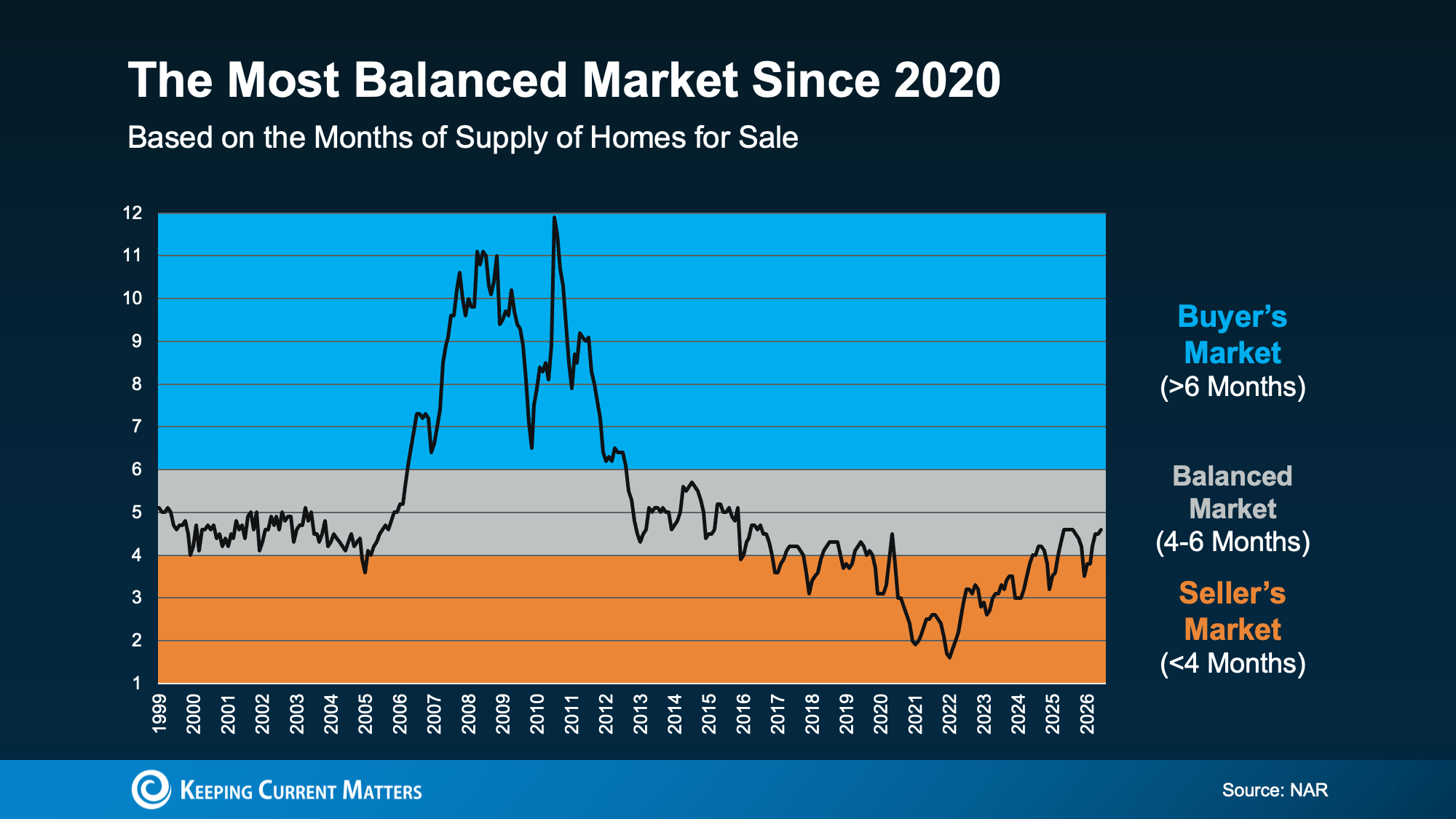
So how do you know which market you’re in? There’s one number that tells the story faster than anything else: the months’ supply of homes for sale. It’s the clearest signal of who’s got leverage – and what strategy you’ll need. Think of it like this.
Imagine no additional homes were listed starting today. Months’ supply tells us how long it would take to sell everything that’s currently on the market based on today’s demand.
Generally speaking, if months’ supply is:
Fewer than 4 months: Sellers usually have the advantage.
4 to 6 months: Buyers and sellers are on more equal footing.
More than 6 months: Buyers can usually negotiate for a better deal.
Right now, the National Association of Realtors (NAR) data says that number is 4.6 and that puts the overall market back in balanced territory (see graph below):
That means, as a whole, the market has finally moved back into a much more balanced range after years of being tilted in sellers’ favor. While that may look like the scales have tipped only slightly, it’s enough to make a real difference in what strategy you’ll need for your move – at least in most places.
The Tale of Two Markets: Why ‘Balanced’ Doesn’t Mean the Same Thing Everywhere
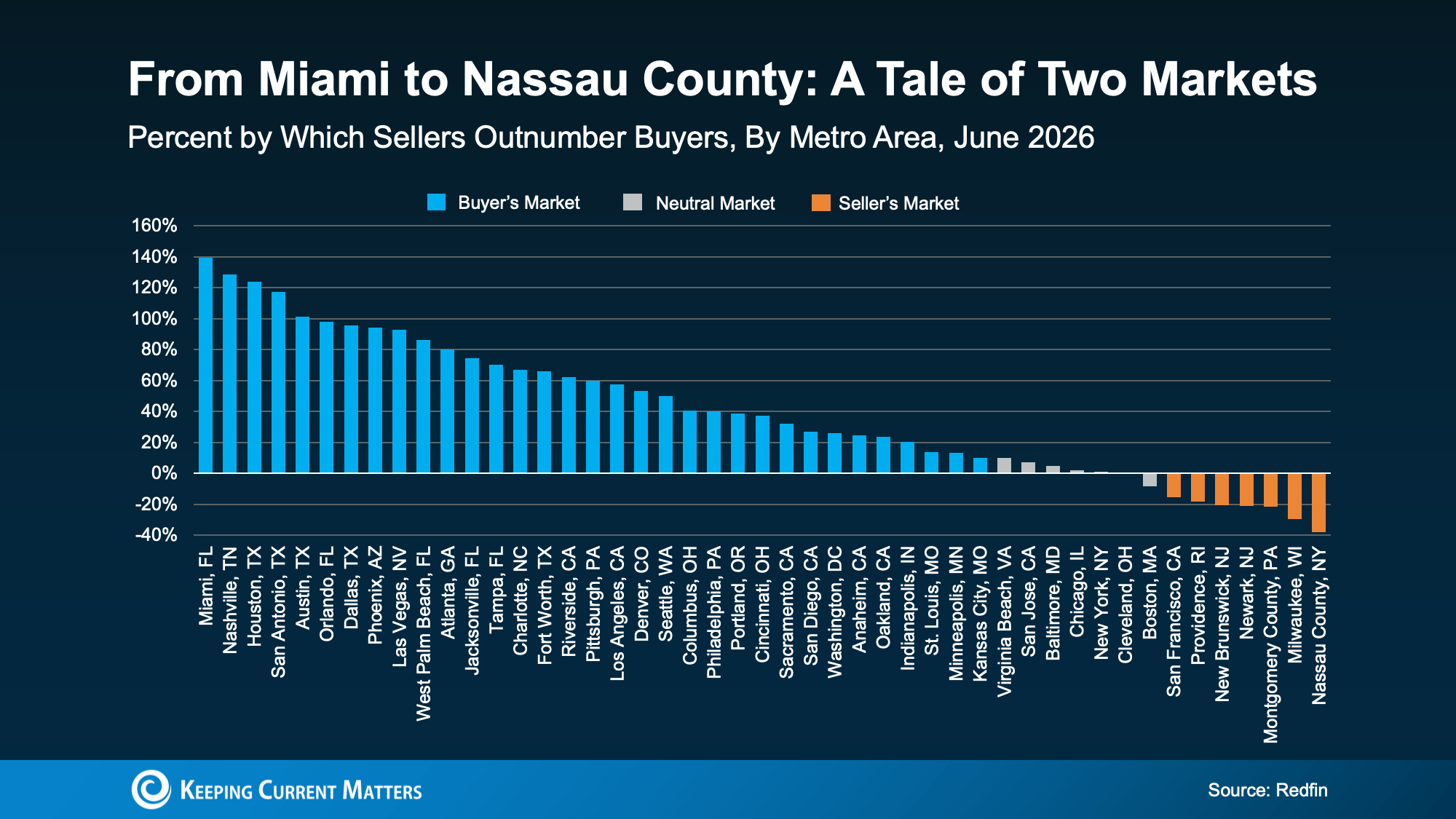
Redfin data helps shed some light on how this shakes out across the country. It breaks down which cities are leaning in either direction (see graph below).
Some markets givebuyersmore leverage.Those are in blue.
Some still favorsellers. That’s the orange.
Others fall somewherein between. Those are gray.
Notice anything? A lot more places are seeing more buyer-friendly conditions right now. In fact, this is the most buyer-friendly market we’ve seen in nearly 6 years.
But don’t take that as buyers have the upper hand everywhere.
There are still cities where sellers still have the power. And if you’re in one of them, your approach to selling or buying looks completely different than it would in a buyer-leaning market.
The Biggest Mistake You Can Make Right Now
That’s why the biggest mistake isn’t thinking it’s finally a buyer’s market. And it isn’t thinking it’s still a seller’s market either. It’s making any assumption without talking to an expert agent first.
Today’s market is incredibly local. In one market, a buyer may be getting thousands of dollars in concessions from a seller. And a homeowner may have to consider dropping their price.
But in another, a buyer may be stressed about coming in with their best offer, or they may lose out on the home to another buyer. And a seller may still be seeing strong demand and prices inching higher.
Same overall housing market.
Very different experiences.
The truth is what’s happening in your back yard affects everything from pricing your house to making an offer to negotiating repairs or concessions. And that’s why an agent’s local knowledge matters more now than ever before.
Your plan has to be based on your neighborhood – and only an agent has the expertise to get that right.
Bottom Line
This market isn’t one-size-fits-all.
If you’re wondering who has the upper hand where you live, talk to a local agent. They’ll help you understand what’s happening in your market, who’s got the leverage, and what strategy gives you the best shot at getting what you want.
LibreOffice, the renowned free and open-source office suite, has recently unveiled its latest iteration, LibreOffice 25.2. This release brings a host of enhancements aimed at improving user experience, bolstering privacy controls, and ensuring seamless interoperability. Let’s delve into the standout features of LibreOffice 25.2. Key Features of LibreOffice 25.2 1. Comprehensive Support for OpenDocument Format … Continue reading LibreOffice 25.2: Empowering Users with Enhanced Features and Improved Performance→
Steam, Valve’s renowned digital distribution platform, continues to influence the gaming landscape with its diverse hardware offerings and evolving software ecosystem. Recent developments have spotlighted both the performance of Steam-compatible devices and the dynamic shifts within its software environment. Steam Hardware: Emerging Devices and Market Dynamics 1. Nvidia RTX 4060 Graphics Card: Dominating the Market … Continue reading In-Depth Review of Steam Hardware and Software: Performance, Popularity, and Emerging Trends→
Kodi, the free and open-source media player developed by the Kodi Foundation, continues to be a popular choice for users seeking a versatile and customizable entertainment hub. Available across multiple operating systems and hardware platforms, Kodi allows users to play and view most videos, music, podcasts, and other digital media files from local and network … Continue reading Kodi Media Player: Enhancing Your Entertainment Experience→





 Notice anything? A lot more places are seeing more buyer-friendly conditions right now. In fact, this is the most buyer-friendly market we’ve seen in nearly 6 years.
